
70-243 · Question #31
Note: This question is part of a series of questions that use the same set of answer choices. An answer choice may be correct for more than one question in the series. Your network contains a System…
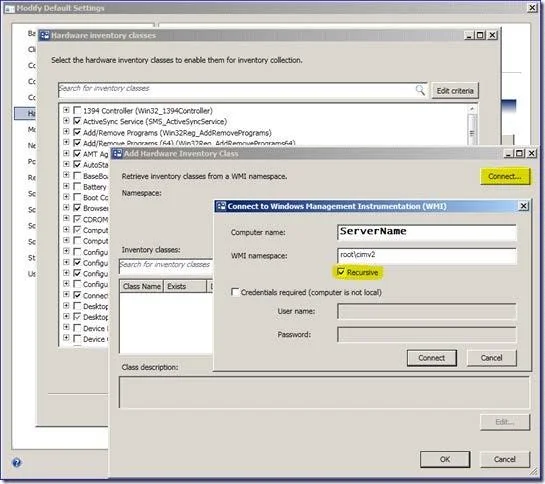
The correct answer is C. Add a WMI class to the Hardware inventory Classes list. Adding new device/class to hardware inventory In the hardware inventory class window click the add button Next click the 'Connect' button Select the desired class and click 'Edit' Give your new device/class a friendly name (instead of the default class name) You can also set…
Question
Note: This question is part of a series of questions that use the same set of answer choices. An answer choice may be correct for more than one question in the series. Your network contains a System Center 2012 Configuration Manager environment. Your company develops a custom hardware device and installs the device on all of the client computers in the research department. You discover that information about the device fails to appear in any inventory queries or reports. Information about other hardware devices appears in the inventory queries and reports. You need to ensure that Configuration Manager data includes information about the custom hardware device. What should you do?
Exhibit
Options
- AEnable a default WMI class in the Hardware Inventory Classes list.
- BModify the Enable hardware inventory on clients setting.
- CAdd a WMI class to the Hardware inventory Classes list.
- DAdd a file name to the Software Inventory configuration.
- ESelect Collect NOIDMIF files in Hardware Inventory.
- FAdd a file name to the Hardware inventory configuration.
- GAdd a file name to Software Metering.
- HAdd a WMI class to the Sms_def.mof file.
- IModify the Enable software inventory on clients setting.
How the community answered
(42 responses)- B7% (3)
- C71% (30)
- D17% (7)
- E2% (1)
- H2% (1)
Explanation
Adding new device/class to hardware inventory In the hardware inventory class window click the add button Next click the 'Connect' button Select the desired class and click 'Edit' Give your new device/class a friendly name (instead of the default class name) You can also set the unit size Now you can select the properties you want to add (as you did in the previous section). You can see the result in the resource explorer: Hardware inventory works by querying Windows Management Instrumentation (WMI) for all data from certain WMI classes. WMI includes classes for operating system configuration and entities (such as user accounts), installed software, software configuration, and other objects (such as for the logged on user). These classes are supplements to hardware classes. Hardware inventory collects information about many things besides hardware. For example, it can inventory software by collecting details about programs listed in Add or Remove Programs in Control Panel or programs that have been installed using Windows Installer. most of your inventory needs can be served by hardware inventory collection alone.
Topics
Community Discussion
No community discussion yet for this question.