
70-243 · Question #13
Your network contains two Active Directory forests named contoso.com and litwareinc.com. You implement System Center 2012 Configuration Manager in the contoso.com forest. You deploy the…
The correct answer is A. Configure a Client Push Installation account. B. Enable Client Push installation. C. Enable Active Directory System Discovery. Prerequisites for Windows Client Deployment in Configuration Manager - Prerequisites for Computer Clients Installation Method Dependencies Client push installation: Client push installation accounts are used to connect to computers to install the client and are specified on the…
Question
Your network contains two Active Directory forests named contoso.com and litwareinc.com. You implement System Center 2012 Configuration Manager in the contoso.com forest. You deploy the Configuration Manager client to alt of the client computers in contoso.com by using a logon script. You need to ensure that the Configuration Manager client is automatically deployed to all of the client computers in the litwareinc.com forest. What should you do? (Choose all that Apply.)
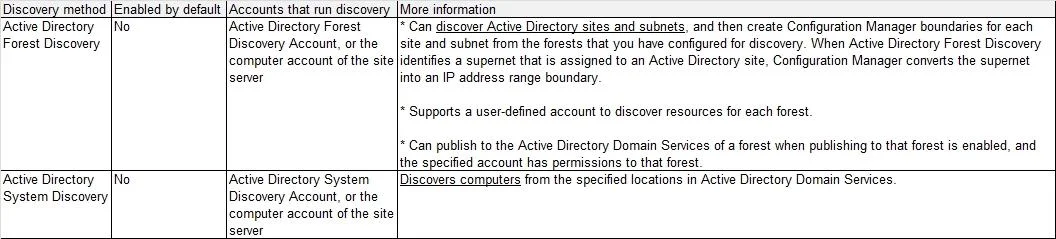
Exhibit
Options
- AConfigure a Client Push Installation account.
- BEnable Client Push installation.
- CEnable Active Directory System Discovery.
- DConfigure an administrative user.
- EEnable Active Directory Forest Discovery.
How the community answered
(47 responses)- A72% (34)
- D9% (4)
- E19% (9)
Explanation
Prerequisites for Windows Client Deployment in Configuration Manager - Prerequisites for Computer Clients Installation Method Dependencies Client push installation: Client push installation accounts are used to connect to computers to install the client and are specified on the Accounts tab of the Client Push Installation Properties dialog box. The account must be a member of the local administrators group on the destination computer. If you do not specify a client push installation account, the site server computer account will be The computer on which you are installing the client must have been discovered by at least one System Center 2012 Configuration Manager discovery method. The computer has an ADMIN$ share. Enable client push installation to assigned resources must be selected in the Client Push Installation Properties dialog box if you want to automatically push the System Center 2012 Configuration Manager client to discovered resources. The client computer must be able to contact a distribution point or a management point to download the supporting files. You must have the following security permissions to install the Configuration Manager client by using client push: To configure the Client Push Installation account: Modify and Read permission for the Site To use client push to install the client to collections, devices and queries: Modify Resource and Read permission for the Collection object. The Infrastructure Administrator security role includes the required permissions to manage client push installation. Further information: and-publishing-in-configuration-manager-2012-beta-2.aspx Active Directory Forest Discovery and Publishing in Configuration Manager 2012 Beta 2 Forest Discovery and Publishing Overview To improve manageability of an ever-changing network environment, Active Directory Forest Discovery is added in Configuration Manager 2012 Beta 2. With it, Configuration Manager can discover Active Directory forests, their domains, AD Sites and IP subnets. Because domain users (or domain computer accounts) have permission to query forest relationships, Active Directory Forest Discovery can return information about other forests and their trust direction. The system can programmatically connect to all the forests and build a complete mapping of the corporate environment. It can also cross forest boundaries using specific credentials for each forest regardless of the trust type. The information obtained through Active Directory Forest Discovery can be directly exported as boundaries or boundary groups. Changes to discovered data are updated dynamically and aged out from the database if no longer present in Active Directory Domain Services. The discovered data is also used when clients request a management point or distribution point to ensure they receive the best possible site system. Planning for Discovery in Configuration Manager Discovery Methods in Configuration Manager Introduction to Client Deployment in Configuration Manager - Deploying the Configuration Manager Client to Windows-Based Computers The following table lists the various methods that you can use to install the Configuration Manager client software on computers: Client push installation - Automatically installs the client to assigned resources and manually installs the client to resources that are not assigned. Software update point installation - Installs the client by using the Configuration Manager software updates feature. Group Policy installation - Installs the client by using Windows Group Policy. Logon script installation - Installs the client by using a logon script. Manual installation - Manually installs the client software. Upgrade installation by using application management - Upgrades clients to a newer version by using Configuration Manager application management. You can also use Configuration Manager 2007 software distribution to upgrade clients to System Center 2012 Configuration Manager. Automatic client upgrade Client imaging - Prestages the client installation in an operating system image.
Topics
Community Discussion
No community discussion yet for this question.