
70-158 · Question #89
Drag and Drop Question You plan to deploy a Forefront Identity Manager (FIM) 2010 server from the test environment to the production environment. You perform the following steps: - Install FIM on a…
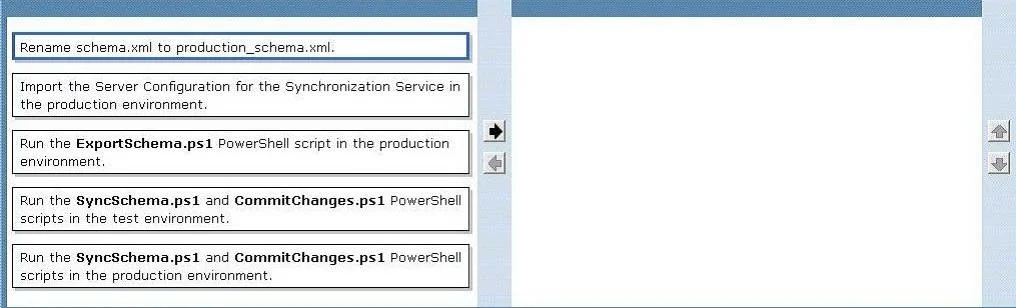
The correct answer is Run the ExportSchema.ps1 PowerShell script in the production environment.; Rename schema.xml to production_schema.xml.; Import the Server Configuration for the Synchronization Service in the production environment.; Run the SyncSchema.ps1 and CommitChanges.ps1 PowerShell scripts in the production environment. FIM 2010: Test -> Production Migration Explanation Context You've already exported schema and policy from test (pilot_schema.xml, pilot_policy.xml) and installed FIM in production with maintenance mode enabled. Now you need to migrate the production schema and sync…
Question
Exhibit
Answer Area
Drag items
Correct arrangement
- Run the ExportSchema.ps1 PowerShell script in the production environment.
- Rename schema.xml to production_schema.xml.
- Import the Server Configuration for the Synchronization Service in the production environment.
- Run the SyncSchema.ps1 and CommitChanges.ps1 PowerShell scripts in the production environment.
Explanation
FIM 2010: Test -> Production Migration Explanation
Context
You've already exported schema and policy from test (pilot_schema.xml, pilot_policy.xml) and installed FIM in production with maintenance mode enabled. Now you need to migrate the production schema and sync configuration.
Step-by-Step Breakdown
Step 1: Run ExportSchema.ps1 in the production environment
Before merging schemas, you must capture the current production schema. This creates a baseline schema.xml representing what production already has. You cannot perform a schema sync without knowing both sides - the pilot (test) schema and the production schema.
Common mistake: Skipping this step because you think production is "blank." Even a fresh FIM install has a default schema that must be exported and acknowledged before merging.
Step 2: Rename schema.xml to production_schema.xml
The export script always outputs schema.xml. Since you already have pilot_schema.xml from the test environment, you rename the production export to avoid overwriting it. Now you have both files clearly identified:
pilot_schema.xml- from testproduction_schema.xml- from production
Common mistake: Forgetting to rename and accidentally overwriting the pilot export, losing the test environment's schema data.
Step 3: Import the Server Configuration for the Synchronization Service in the production environment
With both schemas captured, you import the Synchronization Service configuration (MA configurations, run profiles, etc.) from the test environment into production. This step migrates the sync engine's settings - separate from the FIM Service schema - using the Synchronization Service Manager's import function.
Common mistake: Confusing FIM Service schema migration with Synchronization Service configuration migration. These are two distinct components. The sync config import happens here, before schema reconciliation.
Step 4: Run SyncSchema.ps1 and CommitChanges.ps1 in the production environment
SyncSchema.ps1 compares pilot_schema.xml and production_schema.xml, calculates the delta, and applies the test environment's schema additions to production. CommitChanges.ps1 then commits those changes to the FIM Service database, making them permanent.
Common mistake: Running these scripts before exporting/renaming the production schema. Without
production_schema.xml, the sync script has no baseline to diff against and will fail or produce incorrect results.
Why This Order Matters
The sequence follows a capture -> label -> migrate -> reconcile pattern:
- You must know the current state before you can change it (Steps 1-2)
- The sync engine config must be in place before reconciling schemas (Step 3)
- Schema reconciliation is always the final step after all configurations are in place (Step 4)
Topics
Community Discussion
No community discussion yet for this question.