70-158 · Question #61
70-158 Question #61: Real Exam Question with Answer & Explanation
FIM 2010 Role Separation — Explanation Context You're upgrading from MIIS 2003 + SQL Server 2005 to FIM 2010 and distributing three FIM roles across three existing servers: a former MIIS server (LON-SRV1), a SQL server (LON-SQL), and a Domain Controller (LON-DC1). --- Placement
Question
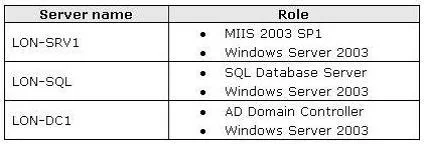
Drag and Drop Question Your company network contains Microsoft Identity Integration Services (MIIS) 2003 and Microsoft SQL Server 2005 configured as shown in the following table. You plan to upgrade the network to Forefront Identity Manager (FIM) 2010. You want to separate the FIM Service, FIM Synchronization Service, and FIM Portal roles. You need to identify the appropriate operating system and server roles that must be installed on the existing hardware. What should you do? (To answer, drag the appropriate component or components to the correct location or locations in the answer area.) Answer:
Explanation
FIM 2010 Role Separation — Explanation
Context
You're upgrading from MIIS 2003 + SQL Server 2005 to FIM 2010 and distributing three FIM roles across three existing servers: a former MIIS server (LON-SRV1), a SQL server (LON-SQL), and a Domain Controller (LON-DC1).
Placement Breakdown
LON-SRV1 → Windows Server 2008 R2 + FIM Service
- FIM 2010 requires Windows Server 2008 R2 (64-bit). LON-SRV1 was running MIIS 2003, which ran on older OS, so the OS must be upgraded first.
- FIM Service is the workflow and policy engine. It's placed here on a dedicated application server — separate from the DC and SQL server — following the principle of role separation.
- FIM Service has its own SQL database backend (on LON-SQL), so it doesn't need to be co-located with SQL Server.
LON-SQL → SQL Server 2008 (64-bit) + FIM Synchronization Service
- FIM requires SQL Server 2008, not 2005 — SQL 2005 is not supported. The 64-bit version is required because FIM 2010 is a 64-bit application and its database requirements exceed 32-bit addressable memory.
- FIM Synchronization Service is placed here because it must run on the same machine as SQL Server or have a tightly coupled SQL instance. The Sync Service has heavy database I/O (connectors, metaverse), so co-locating it with SQL is optimal.
- Common mistake: Choosing 32-bit SQL — FIM 2010 mandates 64-bit SQL Server.
LON-DC1 → Windows Server 2008 R2 + FIM Portal + FIM Password Reset Portal
- The FIM Portal is a SharePoint-based web interface. It requires Windows Server 2008 R2 and is typically placed on or near the Domain Controller because it relies heavily on Active Directory for authentication and group membership.
- FIM Password Reset Portal is co-located with the FIM Portal because both are web-facing components that share the same IIS/SharePoint infrastructure and AD integration.
- LON-DC1 already handles domain authentication, making it the natural host for user-facing web portals that authenticate against AD.
- Common mistake: Placing the Password Reset Portal on LON-SRV1 with FIM Service — these are separate roles and the portal belongs with the other web-facing component on the DC.
Key Principles Behind the Arrangement
| Rule | Rationale |
|---|---|
| OS upgrade on non-DC servers | FIM requires WS 2008 R2; DCs may already meet this |
| 64-bit SQL only | FIM Sync metaverse is memory-intensive; 32-bit is unsupported |
| Sync Service stays near SQL | High I/O coupling between Sync engine and its database |
| Portals go on/near DC | AD-integrated web apps belong close to authentication infrastructure |
| FIM Service on isolated app server | Role separation best practice; reduces attack surface and resource contention |
Common Mistakes
- Picking SQL 2008 32-bit — FIM explicitly requires 64-bit SQL.
- Placing FIM Service on the DC — violates role separation and Microsoft's best practice of not running application services on DCs.
- Separating the Password Reset Portal from the FIM Portal — they share web infrastructure and should be co-located.
- Forgetting the OS upgrade — MIIS 2003 ran on older Windows versions; the upgrade path requires WS 2008 R2 on servers that don't already meet requirements.
Topics
Community Discussion
No community discussion yet for this question.