
5V0-62.22 · Question #20
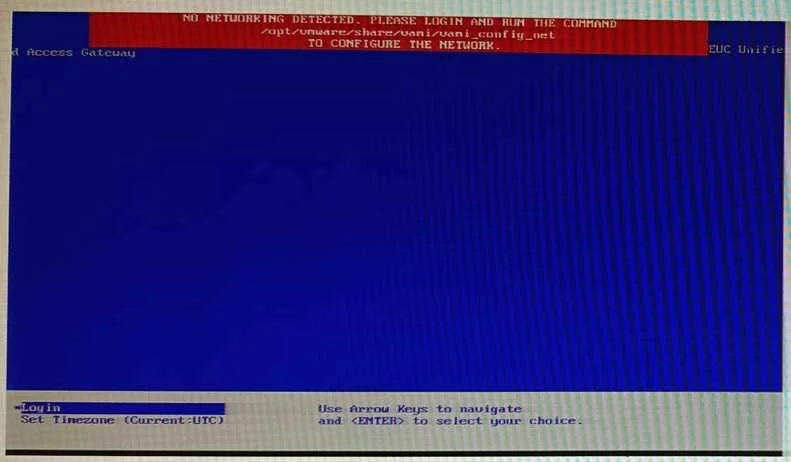
Upon deploying a fresh Unified Access Gateway via the OVF template, the administrator sees the following: Refer to the exhibit. The administrator would like to avoid running the VAMI command and…
The correct answer is C. Redeploy the UAG to ensure that all of the guest property configurations have been configured. The other option to remediate this error message is to redeploy the UAG to ensure that all of the guest property configurations have been configured correctly. The error message indicates that there is a problem with the guest property settings of the UAG appliance, such as…
Question
Upon deploying a fresh Unified Access Gateway via the OVF template, the administrator sees the following:
Refer to the exhibit. The administrator would like to avoid running the VAMI command and reconfiguring the network Which other option to remediate this error message is possible?
Exhibit
Options
- AReboot the UAG, press F10, and in the setparams, enter rw init=/bin/bash.
- BLogin to the UAG with the root account, and manually modify the Ifconfig.
- CRedeploy the UAG to ensure that all of the guest property configurations have been configured
- DPower off the UAG, and reconfigure the quest properties to ensure that the information is correct.
How the community answered
(24 responses)- A8% (2)
- B17% (4)
- C71% (17)
- D4% (1)
Explanation
The other option to remediate this error message is to redeploy the UAG to ensure that all of the guest property configurations have been configured correctly. The error message indicates that there is a problem with the guest property settings of the UAG appliance, such as network configuration, edge service settings, or certificate settings5. Redeploying the UAG can help fix any errors or inconsistencies in the guest property settings.
Topics
Community Discussion
No community discussion yet for this question.