
5V0-62.22 · Question #18
Refer to the exhibit- An IT administrator tried to start a remote session using Workspace ONE Assist but received this request timeout error: What might be the root cause of this issue"?
The correct answer is A. Workspace ONE Assist agent failed to connect to the Workspace ONE Assist server. The root cause of this issue is that Workspace ONE Assist agent failed to connect to the Workspace ONE Assist server. The request timeout error indicates that the Workspace ONE Assist agent did not receive a response from the Workspace ONE Assist server within the specified…
Question
Refer to the exhibit- An IT administrator tried to start a remote session using Workspace ONE Assist but received this request timeout error:
What might be the root cause of this issue"?
Exhibit
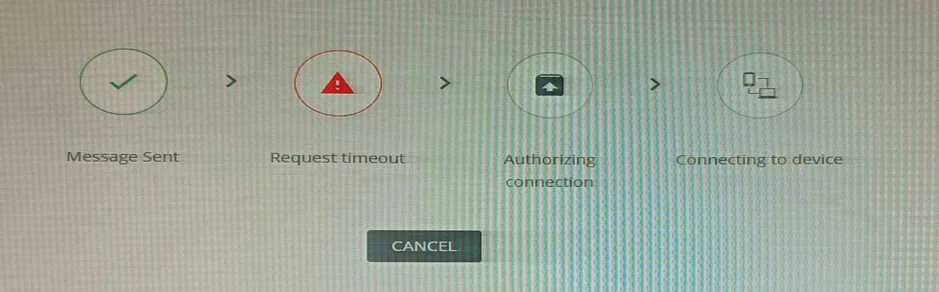
Options
- AWorkspace ONE Assist agent failed to connect to the Workspace ONE Assist server
- BWorkspace ONE Intelligent Hub failed to connect to the Workspace ONE Assist server
- CThe devices were connected remotely using the unattended mode in Workspace ONE Assist agent.
- DThe Administrator didn't have proper level of access to Workspace ONE Assist's features.
How the community answered
(38 responses)- A92% (35)
- B5% (2)
- C3% (1)
Explanation
The root cause of this issue is that Workspace ONE Assist agent failed to connect to the Workspace ONE Assist server. The request timeout error indicates that the Workspace ONE Assist agent did not receive a response from the Workspace ONE Assist server within the specified time limit3. This could be due to network issues, firewall settings, or authentication problems. The administrator should check and resolve these issues to enable remote sessions using Workspace ONE Assist.
Topics
Community Discussion
No community discussion yet for this question.