
350-801 · Question #559
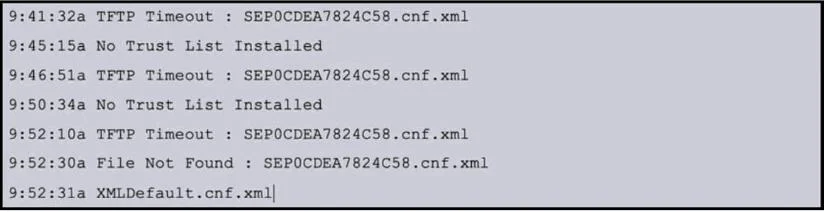
Refer to the exhibit. An administrator is configuring a new phone on a Cisco UCM cluster and the phone failed to register. The Cisco UCM cluster is in non-secure mode. Which action resolves the issue?
The correct answer is C. Delete phone ITL file. The ITL file is used for certificate-based trust between the phone and the Cisco UCM TFTP server. If the ITL file is invalid or missing, the phone cannot securely communicate with the TFTP server to download its configuration. To resolve this, the administrator must manually…
Question
Refer to the exhibit. An administrator is configuring a new phone on a Cisco UCM cluster and the phone failed to register. The Cisco UCM cluster is in non-secure mode. Which action resolves the issue?
Exhibit
Options
- AEnsure that DHCP scope has option 150 configured.
- BManually configure voice VLAN on the phone.
- CDelete phone ITL file.
- DUpdate phone configuration in Cisco UCM with the correct MAC address.
How the community answered
(43 responses)- A5% (2)
- B5% (2)
- C74% (32)
- D16% (7)
Explanation
The ITL file is used for certificate-based trust between the phone and the Cisco UCM TFTP server. If the ITL file is invalid or missing, the phone cannot securely communicate with the TFTP server to download its configuration. To resolve this, the administrator must manually delete the ITL file from the phone. This forces the phone to request a new ITL file from the TFTP server during its next boot. Steps to Delete the ITL File: 1. On the phone, go to Settings > Security Configuration > Trust List. 2. Select ITL File and delete it. 3. Restart the phone to allow it to re-download the correct ITL file and configuration.
Topics
Community Discussion
No community discussion yet for this question.