
350-801 · Question #353
An engineer is configuring Cisco Jabber for Windows and must implement desk phone control mode for some of the users. Which access control group must be configured for those users to enable this…
The correct answer is C. Standard CTI Enabled. To enable desk phone control mode in Cisco Jabber (where Jabber controls a physical IP phone via CTI), the user's End User account in Cisco UCM must be associated with the 'Standard CTI Enabled' access control group. This grants the user permission to use CTI (Computer…
Question
An engineer is configuring Cisco Jabber for Windows and must implement desk phone control mode for some of the users. Which access control group must be configured for those users to enable this functionality?
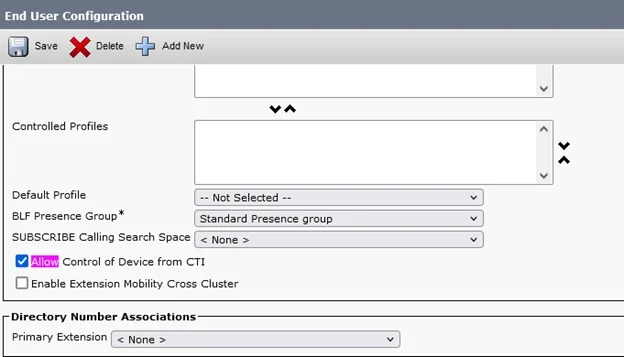
Exhibit
Options
- AAllow Control of Device from CTI
- BStandard CTI Secure Connection
- CStandard CTI Enabled
- DStandard CTI Allow Reception of SRTP Key Material
How the community answered
(26 responses)- A8% (2)
- B4% (1)
- C88% (23)
Explanation
To enable desk phone control mode in Cisco Jabber (where Jabber controls a physical IP phone via CTI), the user's End User account in Cisco UCM must be associated with the 'Standard CTI Enabled' access control group. This grants the user permission to use CTI (Computer Telephony Integration) to control devices. 'Allow Control of Device from CTI' is a setting applied at the device level (not a user group). 'Standard CTI Secure Connection' enables encrypted CTI connections. 'Standard CTI Allow Reception of SRTP Key Material' is needed only when SRTP encryption is involved - it is not required for basic desk phone control.
Topics
Community Discussion
No community discussion yet for this question.