
350-501 · Question #304
Refer to the exhibit. The operations team is implementing an LDP-based configuration in the service provider core network with these requirements: - R1 must establish LDP peering with the loopback…
The correct answer is B. Configure mpls ldp router-id loopback0 on R1 and R2. To successfully enable LDP peering between R1 and R2 while ensuring R1 uses its loopback IP as its Router-ID, both routers should be configured to explicitly use their respective Loopback0 interfaces as their LDP Router-IDs.
Question
Refer to the exhibit. The operations team is implementing an LDP-based configuration in the service provider core network with these requirements:
- R1 must establish LDP peering with the loopback IP address as its
Router-ID.
- Session protection must be enabled on R2.
How must the team update the network configuration to successfully enable LDP peering between R1 and R2?
Exhibit
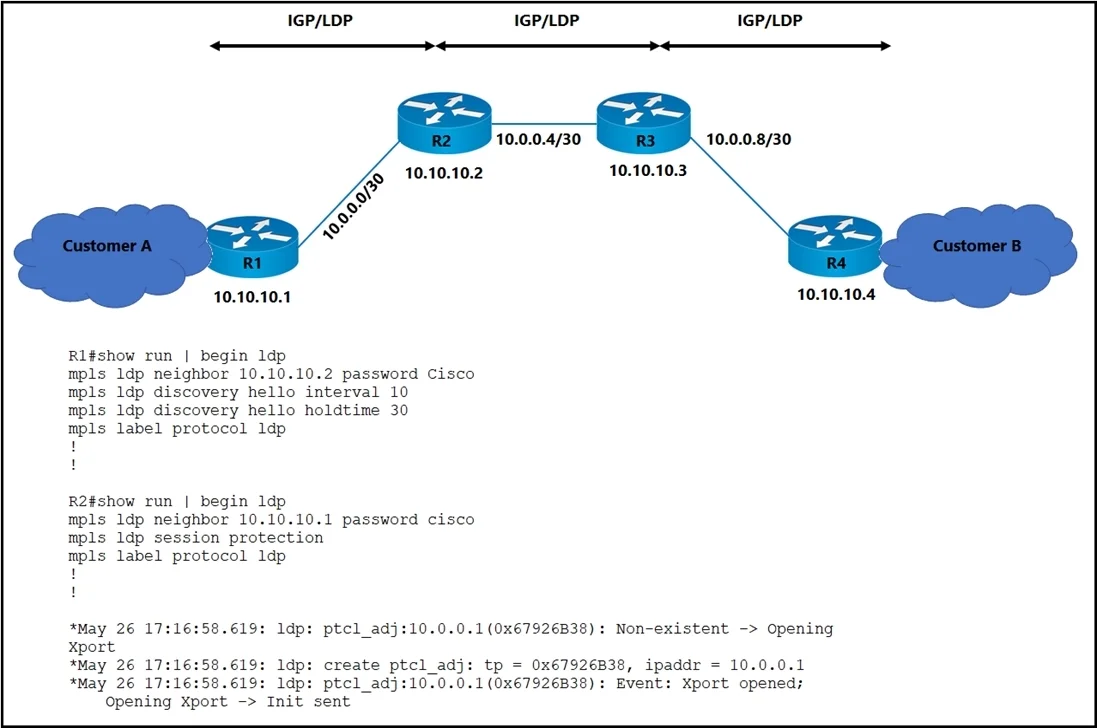
Options
- AChange the LDP password on R2 to Cisco.
- BConfigure mpls ldp router-id loopback0 on R1 and R2.
- CConfigure LDP session protection on R1.
- DChange the discover hello hold time and interval to their default values.
How the community answered
(30 responses)- A7% (2)
- B90% (27)
- C3% (1)
Why each option
To successfully enable LDP peering between R1 and R2 while ensuring R1 uses its loopback IP as its Router-ID, both routers should be configured to explicitly use their respective Loopback0 interfaces as their LDP Router-IDs.
Changing the LDP password is only relevant if LDP authentication is configured and failing, which is not indicated in the requirements or exhibit, and is not a general prerequisite for enabling LDP peering.
The `mpls ldp router-id loopback0` command explicitly configures the LDP Router-ID on both R1 and R2 to be their respective Loopback0 interface IP addresses. This fulfills the requirement for R1 and is a best practice for LDP peering stability, ensuring that LDP sessions are established and maintained using a stable, highly available interface.
LDP session protection enhances resiliency by maintaining sessions during transport link failures but is not required for the initial establishment of LDP peering.
Changing LDP hello hold time and interval to default values is only necessary if custom, incompatible timers have been configured and are preventing adjacency, which is not indicated in the question's requirements.
Concept tested: MPLS LDP Router-ID configuration
Source: https://www.cisco.com/c/en/us/td/docs/ios-xml/ios/mpls/configuration/guide/12_4t/t_mpls-12_4t-book/t_mp_ldp_cfg.html
Topics
Community Discussion
No community discussion yet for this question.