
350-501 · Question #296
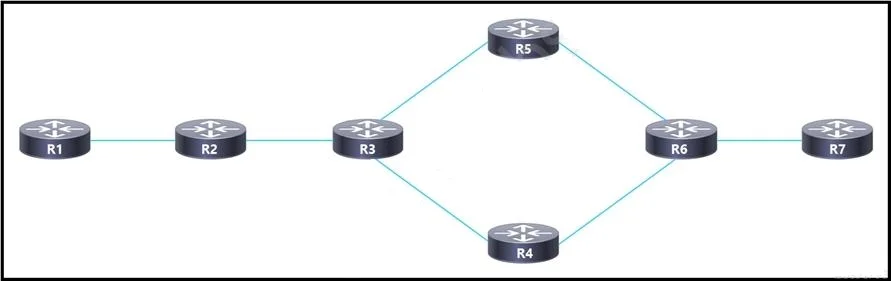
Refer to the exhibit. After a networking team configured this MPLS topology, the supervisor wants to view MPLS labels to verify the path that packets take from router R1 to router R7. The team…
The correct answer is D. Implement MPLS OAM to display the labels for each hop along the path. To view the MPLS labels for each hop along a Label Switched Path (LSP) from R1 to R7, the team must implement MPLS OAM tools, which provide visibility into the label stack and path taken by labeled packets.
Question
Refer to the exhibit. After a networking team configured this MPLS topology, the supervisor wants to view MPLS labels to verify the path that packets take from router R1 to router R7. The team already issued an ICMP ping to verify connectivity between the devices. Which task must the team perform to allow the supervisor to view the label switch path?
Exhibit
Options
- AConfigure MPLS TE to display the labels in the stack between the head and tail-end routers
- BImplement MPLS LDP to assign labels to all the routes in the transit path.
- CConfigure MPLS LDP Sync to sync labels from the routing table to the MPLS forwarding table.
- DImplement MPLS OAM to display the labels for each hop along the path
How the community answered
(40 responses)- A5% (2)
- B15% (6)
- C3% (1)
- D78% (31)
Why each option
To view the MPLS labels for each hop along a Label Switched Path (LSP) from R1 to R7, the team must implement MPLS OAM tools, which provide visibility into the label stack and path taken by labeled packets.
MPLS TE (Traffic Engineering) is used to establish and manage constrained LSPs, not primarily for displaying labels of existing paths.
MPLS LDP (Label Distribution Protocol) is used to assign and distribute labels for IP prefixes, enabling the creation of LSPs, but it does not provide a mechanism to "view" labels along the path in a diagnostic manner.
MPLS LDP Sync is a feature to ensure that LDP sessions are stable before IP routing protocols use the LSP, often used in conjunction with graceful restart, but it doesn't provide a way to display labels along a path for verification.
MPLS OAM (Operations, Administration, and Maintenance) includes tools like `traceroute mpls` and `ping mpls`. These commands are specifically designed to verify MPLS forwarding paths and display the label stack information at each hop, which is exactly what the supervisor wants to view.
Concept tested: MPLS OAM for path verification
Source: https://www.cisco.com/c/en/us/td/docs/ios/mpls/configuration/guide/12_4t/t_mpls-12_4t-book/t_mp_ping_trace.html
Topics
Community Discussion
No community discussion yet for this question.