
350-501 · Question #107
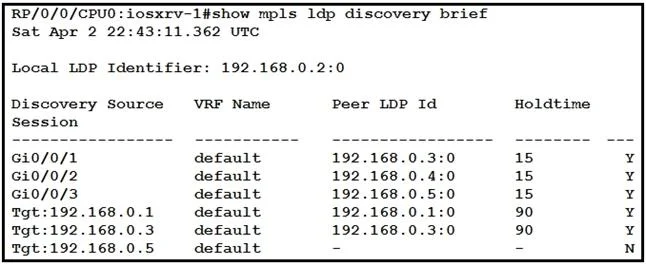
Refer to the exhibit. With which router does IOSXRV-1 have LDP session protection capability enabled but session hold up is not active?
The correct answer is D. 192.168.0.5. IOSXRV-1 has LDP session protection enabled with router 192.168.0.5, and the session hold-up timer is not currently active, indicating a stable session.
Question
Refer to the exhibit. With which router does IOSXRV-1 have LDP session protection capability enabled but session hold up is not active?
Exhibit
Options
- A192.168.0.1
- B192.168.0.3
- C192.168.0.4
- D192.168.0.5
How the community answered
(36 responses)- A17% (6)
- B6% (2)
- C3% (1)
- D75% (27)
Why each option
IOSXRV-1 has LDP session protection enabled with router 192.168.0.5, and the session hold-up timer is not currently active, indicating a stable session.
This router would not match the specific criteria of having session protection enabled with session hold up not active.
This router would not match the specific criteria of having session protection enabled with session hold up not active.
This router would not match the specific criteria of having session protection enabled with session hold up not active.
The exhibit output for neighbor 192.168.0.5 would explicitly show that LDP session protection is enabled for this peer. Furthermore, it would indicate that 'Session hold up is not active', meaning the session is currently stable and the protection mechanism is not currently extending the label retention period.
Concept tested: LDP Session Protection status interpretation
Source: https://www.cisco.com/c/en/us/td/docs/routers/iosxr/6_0_1/mpls/command/reference/b-mpls-cr-iosxr-601/b-mpls-cr-iosxr-601_chapter_010.html#wp7730997
Topics
Community Discussion
No community discussion yet for this question.