
350-401 · Question #492
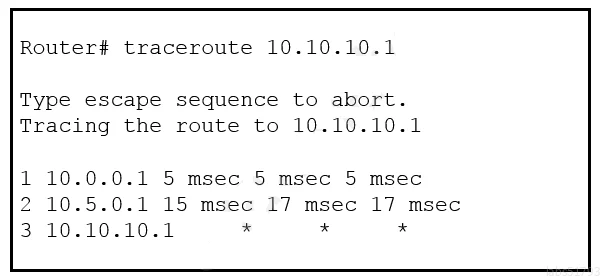
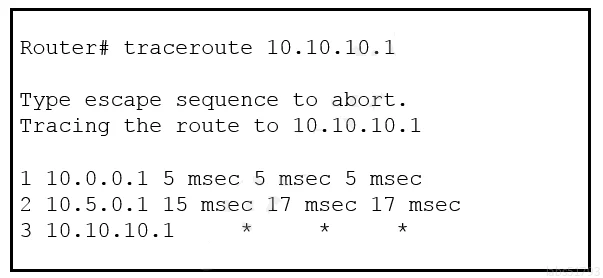
Refer to the exhibit. An engineer is troubleshooting a connectivity issue and executes a traceoute. What does the result confirm?
The correct answer is D. The probe timed out. Traceroute Timeout Explanation When a traceroute probe receives no response within the allotted time, the tool displays an asterisk (``) or the message "Request timed out" for that hop - this indicates the probe timed out (D), meaning either the router is not responding to…
Question
Refer to the exhibit. An engineer is troubleshooting a connectivity issue and executes a traceoute. What does the result confirm?
Exhibits
Options
- AThe destination server reported it is too busy
- BThe protocol is unreachable
- CThe destination port is unreachable
- DThe probe timed out
How the community answered
(44 responses)- A2% (1)
- B5% (2)
- C2% (1)
- D91% (40)
Explanation
Traceroute Timeout Explanation
When a traceroute probe receives no response within the allotted time, the tool displays an asterisk (*) or the message "Request timed out" for that hop - this indicates the probe timed out (D), meaning either the router is not responding to TTL-expired packets or a firewall is silently dropping them.
- Option A is wrong because a "too busy" condition would still generate an ICMP response; the server would need to actively reply to communicate that status.
- Option B is wrong because "Protocol Unreachable" is a specific ICMP Type 3, Code 2 message that would appear as an actual response, not a timeout.
- Option C is wrong because "Destination Port Unreachable" is ICMP Type 3, Code 3, which also generates an active response - commonly seen when using UDP-based traceroute hitting a closed port at the final destination.
Memory Tip: Think of it this way - asterisks = absence of reply = timeout. Any actual ICMP error message (unreachable, busy, etc.) requires the remote device to actively send something back. If nothing comes back, the probe simply timed out.
Topics
Community Discussion
No community discussion yet for this question.