
350-401 · Question #1039
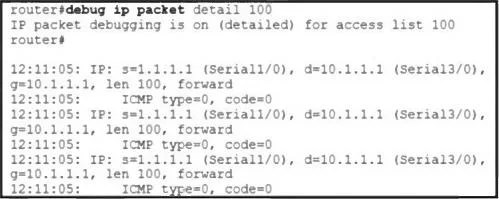
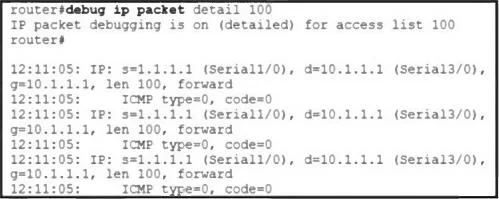
Refer to the exhibit. A network engineer issues the debug command while troubleshooting a network issue. What does the output confirm?
The correct answer is D. ACL100 is tracking ICMP traffic from 1.1.1.1 destined for 10.1.1.1. The debug ip icmp command displays information about ICMP packets and, when combined with ACL logging, can confirm specific traffic flows evaluated by an ACL.
Question
Exhibits
Options
- AACL 100 is tracking ICMP traffic from 10.1.1.1 destined for 1.1.1.1.
- BACL100 is tracking all traffic from 10.1.1.1 destined for 1.1.1.1.
- CACL100 is tracking ICMP traffic from Serial1/0 destined for Serial3/0.
- DACL100 is tracking ICMP traffic from 1.1.1.1 destined for 10.1.1.1.
How the community answered
(35 responses)- A9% (3)
- B17% (6)
- C6% (2)
- D69% (24)
Why each option
The `debug ip icmp` command displays information about ICMP packets and, when combined with ACL logging, can confirm specific traffic flows evaluated by an ACL.
Without the exhibit, it's impossible to confirm the specific direction or source/destination, but this option implies a different traffic flow than the correct answer.
ACL100 would typically track specific types of traffic based on its configuration, not 'all traffic' between two hosts, especially with `debug ip icmp` only showing ICMP.
ACLs track IP addresses, not interfaces like Serial1/0 or Serial3/0, although traffic might traverse those interfaces. The debug output would show IP addresses.
The `debug ip icmp` command captures and displays details about ICMP packets (such as pings) as they are processed by the router. If the debug output includes information about `ACL100` specifically tracking ICMP packets originating from `1.1.1.1` and destined for `10.1.1.1`, then this statement is confirmed.
Concept tested: Debugging ICMP and ACLs
Source: https://www.cisco.com/c/en/us/td/docs/ios/12_2/debug/command/reference/drfioscr.html
Topics
Community Discussion
No community discussion yet for this question.