
350-401 · Question #452
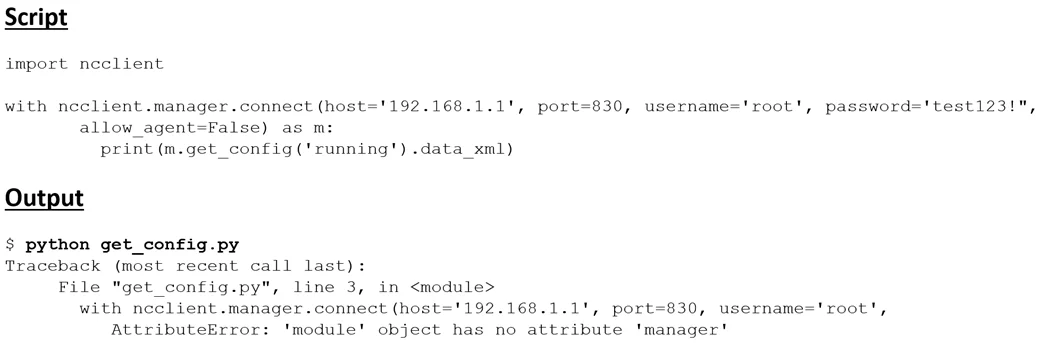
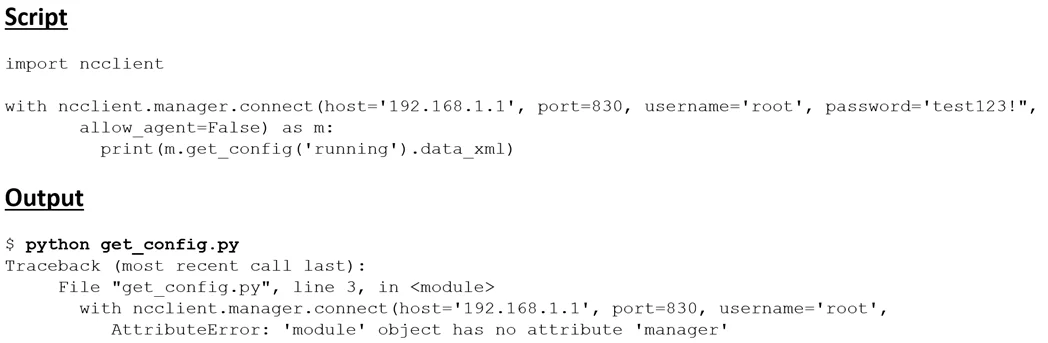
Running the script causes the output in the exhibit. Which change to the first line of the script resolves the error?
The correct answer is A. from ncclient import manager. Explanation Option A (from ncclient import manager) is correct because it uses proper Python syntax to import the specific manager module from the ncclient package, making it directly accessible in the script without needing to reference the full package path. Option B (import…
Question
Running the script causes the output in the exhibit. Which change to the first line of the script resolves the error?
Exhibits
Options
- Afrom ncclient import manager
- Bimport manager
- Cfrom ncclient import*
- Dncclient manager import
How the community answered
(43 responses)- A86% (37)
- B2% (1)
- C5% (2)
- D7% (3)
Explanation
Explanation
Option A (from ncclient import manager) is correct because it uses proper Python syntax to import the specific manager module from the ncclient package, making it directly accessible in the script without needing to reference the full package path.
Option B (import manager) is incorrect because it attempts to import manager as a standalone module without specifying the ncclient package it belongs to, which would cause a ModuleNotFoundError. Option C (from ncclient import *) would technically work by importing everything from ncclient, but it is not the targeted fix the question asks for and is considered bad practice. Option D (ncclient manager import) is completely invalid Python syntax and would immediately throw a SyntaxError.
Memory Tip: Think of the from...import syntax as an address: from [package/house] import [specific item/room]. When you need a specific tool like manager from the ncclient toolbox, use from ncclient import manager - it's precise, clean, and follows proper Python import conventions used heavily in network automation (NETCONF/YANG workflows).
Topics
Community Discussion
No community discussion yet for this question.