
350-401 · Question #231
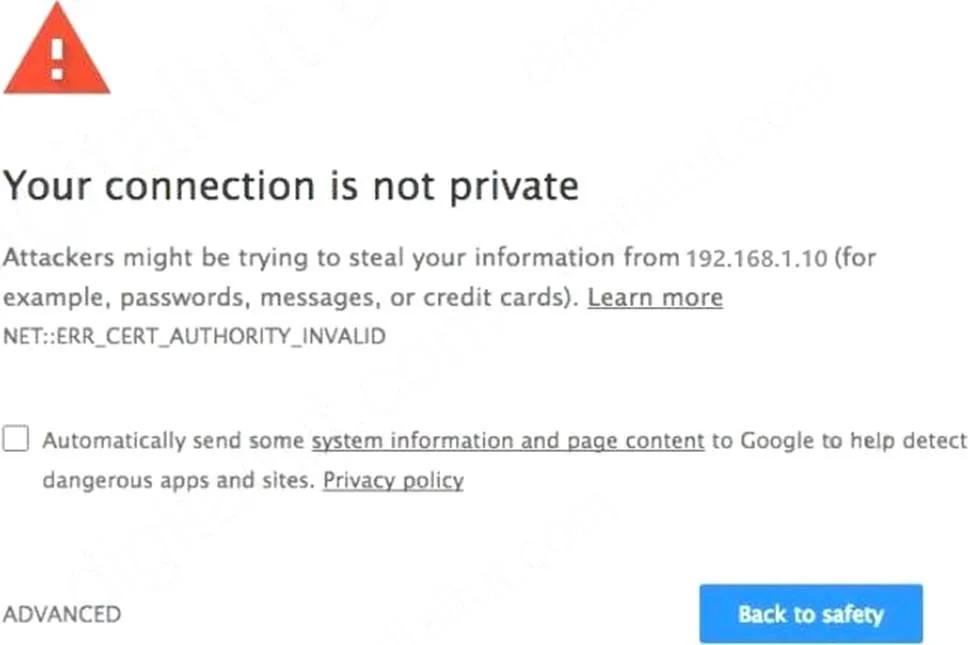
Refer to the exhibit. An engineer is designing a guest portal on Cisco ISE using the default configuration. During the testing phase, the engineer receives a warning when displaying the guest…
The correct answer is B. The server that is providing the portal has a self-signed certificate. When a Cisco ISE guest portal is configured with default settings, a common browser warning during testing indicates that the server providing the portal is using a self-signed certificate.
Question
Refer to the exhibit. An engineer is designing a guest portal on Cisco ISE using the default configuration. During the testing phase, the engineer receives a warning when displaying the guest portal. Which issue is occurring?
Exhibits
Options
- AThe server that is providing the portal has an expired certificate
- BThe server that is providing the portal has a self-signed certificate
- CThe connection is using an unsupported protocol
- DThe connection is using an unsupported browser
How the community answered
(27 responses)- A4% (1)
- B67% (18)
- C11% (3)
- D19% (5)
Why each option
When a Cisco ISE guest portal is configured with default settings, a common browser warning during testing indicates that the server providing the portal is using a self-signed certificate.
An expired certificate would typically result in a browser warning explicitly stating that the certificate is expired, rather than a general warning about an untrusted site as commonly seen with default ISE deployments.
Cisco ISE, by default, generates self-signed certificates for its portal services when initially deployed or not integrated with a trusted Certificate Authority (CA). Web browsers do not inherently trust self-signed certificates, leading to security warnings to alert users about the unverified identity of the website.
A connection using an unsupported protocol would typically manifest as a connection failure or a distinct protocol error message, not primarily as a security warning related to certificate trust.
An unsupported browser would usually display a browser compatibility message or render the page incorrectly, rather than generating a security warning specifically about the site's certificate.
Concept tested: Cisco ISE guest portal SSL certificates
Source: https://www.cisco.com/c/en/us/td/docs/security/ise/3-1/admin_guide/b_ISE_admin_3_1/b_ISE_admin_3_1_chapter_0100.html
Topics
Community Discussion
No community discussion yet for this question.