
350-401 · Question #222
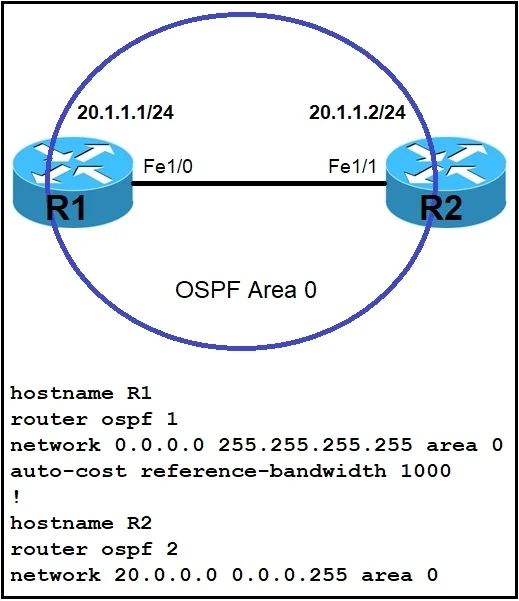
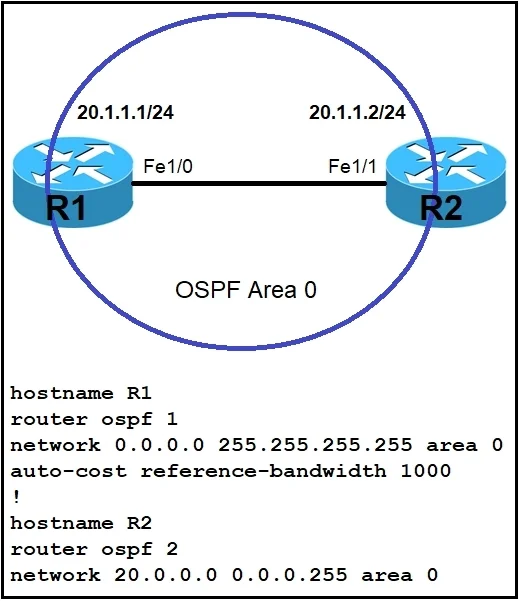
Refer to the exhibit. Which command must be applied to R2 for an OSPF neighborship to form?
The correct answer is A. network 20.1.1.2.0.0.0.0 area 0. To form an OSPF neighborship on R2, the network command must be applied to include the interface's specific IP address (20.1.1.2) within Area 0, using a host wildcard mask.
Question
Refer to the exhibit. Which command must be applied to R2 for an OSPF neighborship to form?
Exhibits
Options
- Anetwork 20.1.1.2.0.0.0.0 area 0
- Bnetwork 20.1.1.2 255.255.0.0. area 0
- Cnetwork 20.1.1.2 0.0.255.255 area 0
- Dnetwork 20.1.1.2 255.255.255 area 0
How the community answered
(31 responses)- A84% (26)
- B3% (1)
- C3% (1)
- D10% (3)
Why each option
To form an OSPF neighborship on R2, the `network` command must be applied to include the interface's specific IP address (20.1.1.2) within Area 0, using a host wildcard mask.
The command `network 20.1.1.2 0.0.0.0 area 0` correctly enables OSPF on the interface with IP address 20.1.1.2, assigning it to Area 0. The wildcard mask 0.0.0.0 specifically matches only the host address, making this a valid and precise way to activate OSPF on a single interface.
The wildcard mask `255.255.0.0` is incorrect for an OSPF network command; it's a subnet mask and not a valid wildcard mask in this context.
The wildcard mask `0.0.255.255` is incorrect as it implies a /16 network, which would not match a typical /24 interface subnet, and is not the inverse of a /24 subnet mask.
The wildcard mask `255.255.255` is incomplete; a valid wildcard mask requires four octets, like 0.0.0.0 or 0.0.0.255.
Concept tested: OSPF network command configuration
Source: https://www.cisco.com/c/en/us/td/docs/ios-xml/ios/iproute_ospf/configuration/15-s/iro-15-s-book/config-ospf.html
Topics
Community Discussion
No community discussion yet for this question.