
350-401 · Question #131
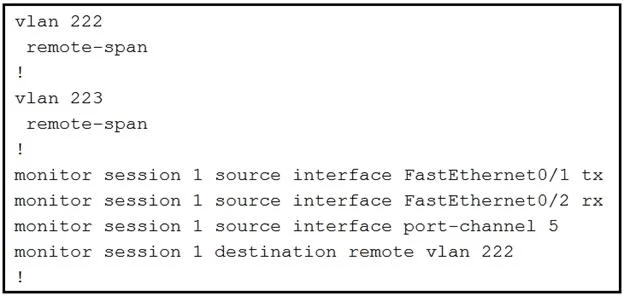
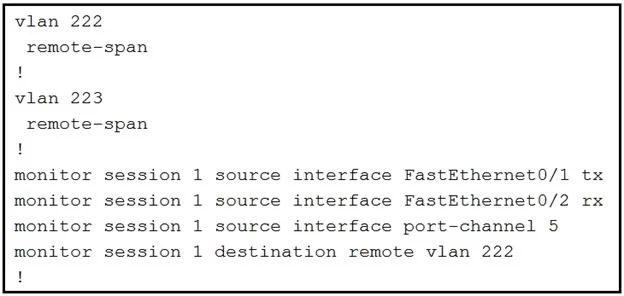
Refer to the exhibit. What is the result when a technician adds the monitor session 1 destination remote vlan 223 command?
The correct answer is A. The RSPAN VLAN is replaced by VLAN 223. When configuring a Cisco RSPAN session, adding a new destination remote VLAN to an existing monitor session ID will replace the previously configured destination.
Question
Refer to the exhibit. What is the result when a technician adds the monitor session 1 destination remote vlan 223 command?
Exhibits
Options
- AThe RSPAN VLAN is replaced by VLAN 223.
- BRSPAN traffic is sent to VLANs 222 and 223.
- CAn error is flagged for configuring two destinations.
- DRSPAN traffic is split between VLANs 222 and 223.
How the community answered
(25 responses)- A80% (20)
- B12% (3)
- C4% (1)
- D4% (1)
Why each option
When configuring a Cisco RSPAN session, adding a new destination remote VLAN to an existing monitor session ID will replace the previously configured destination.
Cisco SPAN and RSPAN monitor sessions are designed to have a single destination for a given session ID. When the `monitor session 1 destination remote vlan 223` command is issued, it overwrites any previously configured destination for `monitor session 1`, replacing VLAN 222 with VLAN 223 as the RSPAN destination.
A single SPAN/RSPAN session does not support simultaneously sending monitored traffic to multiple destination VLANs.
The standard behavior for configuring a new destination in an existing SPAN/RSPAN session is to replace the previous one, not to flag an error, assuming valid syntax and available resources.
RSPAN traffic is not split between multiple destination VLANs for a single session; it is directed entirely to the single configured destination.
Concept tested: RSPAN destination configuration behavior
Source: https://www.cisco.com/c/en/us/td/docs/switches/lan/catalyst3750/software/release/12-2_35_se/configuration/guide/scg/swspan.html
Topics
Community Discussion
No community discussion yet for this question.