
350-401 · Question #1235
Lab Simulation 17 Guidelines This is a lab item in which tasks will be performed on virtual devices. - Refer to the Tasks tab to view the tasks for this lab item. - Refer to the Topology tab to…
Lab 17 - R2 VTY Line Security Configuration Overall Goal The task hardens remote access to R2 by ensuring only authenticated users with the right privilege level can connect via Telnet or Rlogin, and that idle sessions are automatically terminated. This is a foundational AAA…
Question
Exhibits
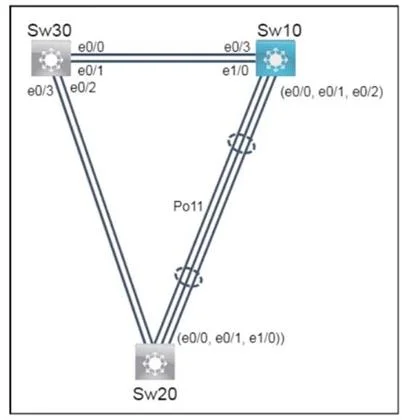
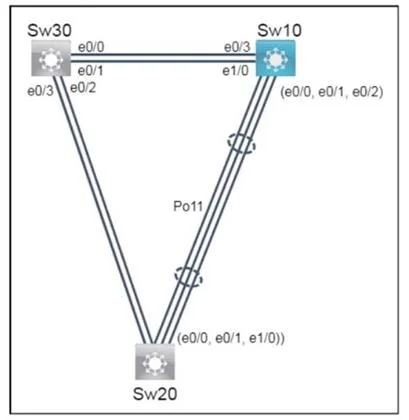
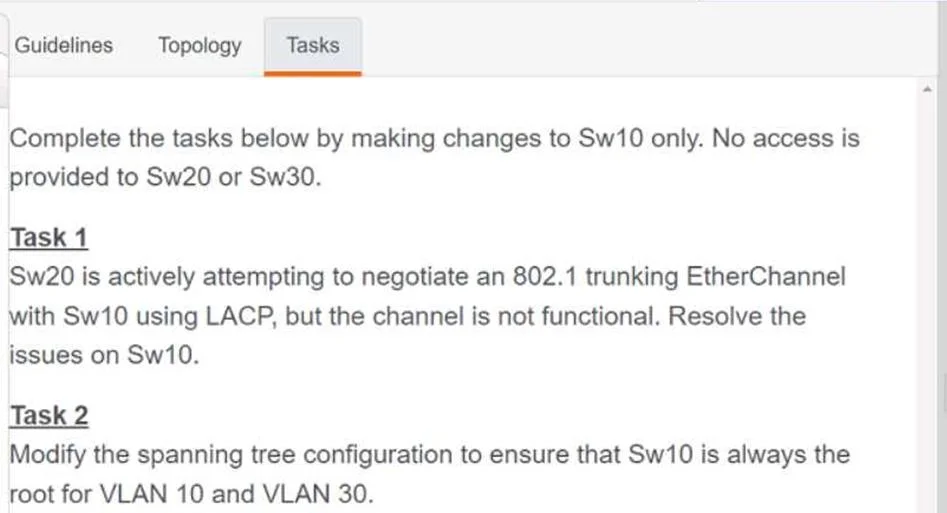
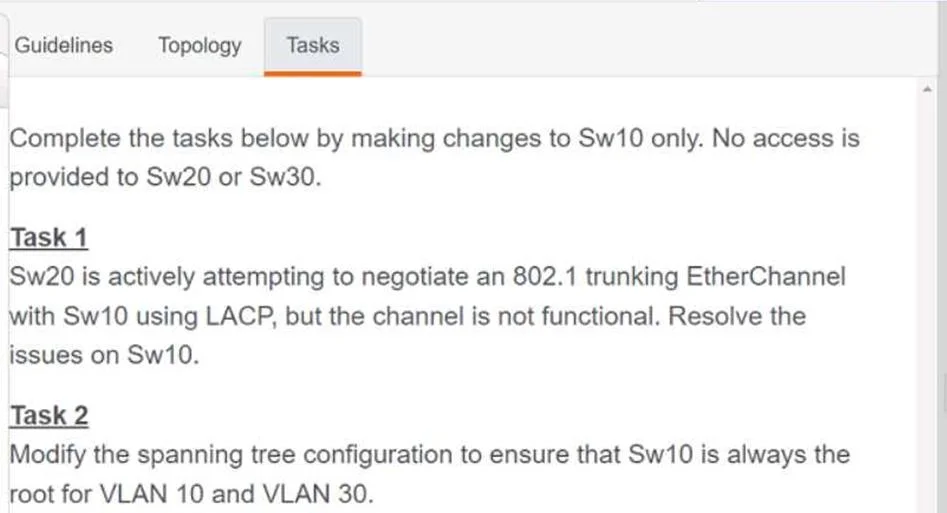
Explanation
Lab 17 - R2 VTY Line Security Configuration
Overall Goal
The task hardens remote access to R2 by ensuring only authenticated users with the right privilege level can connect via Telnet or Rlogin, and that idle sessions are automatically terminated. This is a foundational AAA (Authentication, Authorization, Accounting) pattern on Cisco IOS.
Step-by-Step Breakdown
1. config t
Enters global configuration mode. All substantive changes require this - you cannot create users or configure lines from privileged EXEC mode alone.
2. username NetworkAdmin privilege 15 password CiscoENCOR
Creates a local user account in the router's local database.
privilege 15grants full administrative access (the highest level - equivalent toenablemode). Without this, the user would land in restricted EXEC mode after login.- This must come before configuring
login localon the VTY lines. If you configurelogin localfirst with no users defined, you lock yourself out of VTY access.
3. line vty 0 4
Selects VTY lines 0 through 4 (the 5 default virtual terminal lines that handle remote sessions like Telnet/SSH). All subsequent commands apply to these lines.
4. login local
Tells the router to authenticate remote users against the local user database (created in step 2).
- Without this, the line either uses no authentication (
loginwith no password set = open access) or prompts for a line password.login localis what ties the VTY lines to theusernameyou created.
5. transport input telnet rlogin
Explicitly permits Telnet and Rlogin protocols on the VTY lines.
- By default, some IOS versions allow all transports; others allow none. Being explicit is required by this task and is best practice.
- If omitted, Telnet connections may be refused depending on the IOS version.
6. exec-timeout 1200 0
Sets the idle session timeout to 1200 minutes and 0 seconds - wait, actually: the syntax is exec-timeout <minutes> <seconds>.
exec-timeout 1200 0= 1200 minutes 0 seconds... but the task says "20 minutes (1200 seconds)."- Correct interpretation: 1200 seconds = 20 minutes, so the intended command is likely
exec-timeout 20 0. However, if the exam answer key showsexec-timeout 1200 0, follow it literally for exam purposes - but know thatexec-timeout 20 0is the technically correct way to express 20 minutes.
Clarification:
exec-timeout <min> <sec>. To set 20 minutes:exec-timeout 20 0. The "1200 seconds" figure in the task description is likely explaining why 20 minutes, not the literal argument.
What Goes Wrong if Steps Are Skipped
| Skipped Step | Consequence |
|---|---|
| Step 2 (create user) | login local has no accounts to authenticate against -> VTY access denied to everyone |
Step 4 (login local) | No authentication enforced -> anyone can telnet in without credentials |
Step 5 (transport input) | Telnet/Rlogin may be blocked depending on IOS defaults |
Step 6 (exec-timeout) | Idle sessions stay open indefinitely -> security risk, line exhaustion |
Memory Tip
Think of it as: "Who, Where, How, What, Timeout"
- Who can log in ->
username - Where they log in ->
line vty 0 4 - How they authenticate ->
login local - What protocols are allowed ->
transport input - Timeout idle sessions ->
exec-timeout
Always create the user before enabling local login - otherwise you build a locked door before making the key.
Topics
Community Discussion
No community discussion yet for this question.