
350-001 · Question #73
Refer to the exhibit. You are trying to police down to 100 Mb/s. While testing, you notice that you rarely exceed 70-80 Mb/s. What do you need to change in your MQC configuration to allow for 100…
The correct answer is B. Change the Bc value to allow for a large enough burst. Burst size--Also called the Committed Burst (Bc) size, it specifies in bits (or bytes) per burst how much traffic can be sent within a given unit of time to not create scheduling concerns. (For a shaper, such as GTS, it specifies bits per burst; for a policer, such as CAR, it…
Question
Refer to the exhibit. You are trying to police down to 100 Mb/s. While testing, you notice that you rarely exceed 70-80 Mb/s. What do you need to change in your MQC configuration to allow for 100 Mb/s speeds?
Exhibit
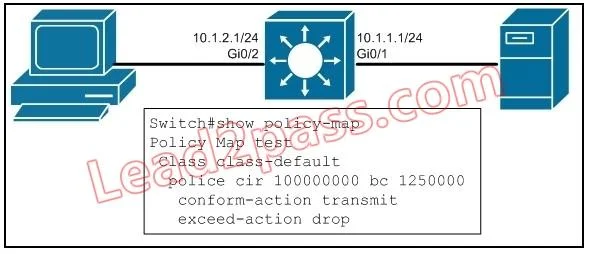
Options
- AChange the CIR value from 100 Mb/s to 200 Mb/s.
- BChange the Bc value to allow for a large enough burst.
- CChange the QoS queue from default to priority.
- DChange the exceed-action to transmit.
How the community answered
(45 responses)- A16% (7)
- B76% (34)
- C2% (1)
- D7% (3)
Explanation
Burst size--Also called the Committed Burst (Bc) size, it specifies in bits (or bytes) per burst how much traffic can be sent within a given unit of time to not create scheduling concerns. (For a shaper, such as GTS, it specifies bits per burst; for a policer, such as CAR, it specifies bytes per
Topics
Community Discussion
No community discussion yet for this question.