
350-001 · Question #68
Refer to the exhibit. What is true about the configuration in this exhibit?
The correct answer is B. It will create a class map that matches the content of ACL 101 and the HTTP protocol, and will. Technically the syntax is incorrect as the application that is being inspected should be listed after the keyword type. However, this is not listed as one of the options. The correct configuration should be as follows: class-map type inspect http match-all el match access-group…
Question
Refer to the exhibit. What is true about the configuration in this exhibit?
Exhibit
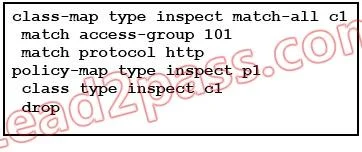
Options
- AIt is an invalid configuration because it includes both an application layer match and and a
- BIt will create a class map that matches the content of ACL 101 and the HTTP protocol, and will
- CIt will create a class map that matches the content of ACL 101 and the HTTP protocol, and will
- DIt will create a class map that matches the content of ACL 101 or the HTTP protocol (depending
- EIt will create a class map that matches the content of ACL 101 or the HTTP protocol (depending
- FIt is an invalid configuration because the class map and policy map names must match.
How the community answered
(31 responses)- A13% (4)
- B74% (23)
- C3% (1)
- D3% (1)
- E6% (2)
Explanation
Technically the syntax is incorrect as the application that is being inspected should be listed after the keyword type. However, this is not listed as one of the options. The correct configuration should be as follows: class-map type inspect http match-all el match access-group 101 policy-map type inspect http pl class type inspect el drop When multiple match criteria exist in the traffic class, you can identify evaluation instructions using the match any or match-all keywords. If you specify match-any as the evaluation instruction, the traffic being evaluated must match one of the specified criteria, typically match commands of the same type. If you specify match-all as the evaluation instruction, the traffic being evaluated must match all the specified criteria, typically match commands of different types. Identifying Traffic in an Inspection Class Map This type of class map allows you to match criteria that is specific to an application. For example, for DNS traffic, you can match the domain name in a DNS query. Note Not all applications support inspection class maps. See the CLI help for a list of supported applications. A class map groups multiple traffic matches (in a match-all class map), or lets you match any of a list of matches (in a match-any class map). The difference between creating a class map and defining the traffic match directly in the inspection policy map is that the class map lets you group multiple match commands, and you can reuse class maps. For the traffic that you identify in this class map, you can specify actions such as dropping, resetting, and/or logging the connection in the inspection policy map. If you want to perform different actions on different types of traffic, you should identify the traffic directly in the policy map. To define an inspection class map, perform the following steps: Step 1 (Optional) If you want to match based on a regular expression, see the "Creating a Regular Expression" section and the "Creating a Regular Expression Class Map" section. Step 2 Create a class map by entering the following command: hostname(config)# class-map type inspect application [match-all | match-any] class_map_name hostname(config-cmap)#
Topics
Community Discussion
No community discussion yet for this question.