
350-001 · Question #113
Refer to the exhibit. In the diagram, the switches are running IEEE 802.1w RSPT. On which ports should root guard be enabled in order to facilitate deterministic root bridge election under normal…
The correct answer is F. GE-3/1, GE-3/2, GE-4/1, GE-4/2, FE-2/1, FE-3/2. Root Guard is a Cisco-specific feature that prevents a Layer 2 switched port from becoming a root port. It is enabled on ports other than the root port and on switches other than the root. If a Root Guard port receives a BPDU that might cause it to become a root port, then the…
Question
Refer to the exhibit. In the diagram, the switches are running IEEE 802.1w RSPT. On which ports should root guard be enabled in order to facilitate deterministic root bridge election under normal and failure scenarios?
Exhibit
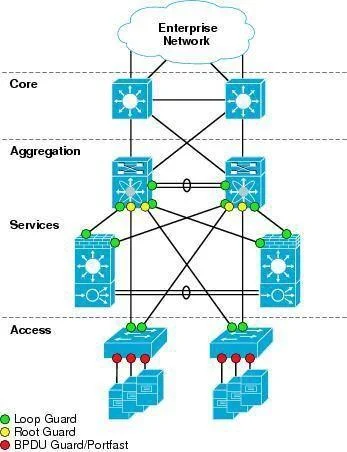
Options
- AGE-3/1, GE-3/2
- BFE-2/1, FE-3/2
- CGE-1/1, GE-1/2
- DGE-4/1, GE-4/2
- EGE-2/1, GE-2/2
- FGE-3/1, GE-3/2, GE-4/1, GE-4/2, FE-2/1, FE-3/2
How the community answered
(26 responses)- A12% (3)
- B4% (1)
- C4% (1)
- E15% (4)
- F65% (17)
Explanation
Root Guard is a Cisco-specific feature that prevents a Layer 2 switched port from becoming a root port. It is enabled on ports other than the root port and on switches other than the root. If a Root Guard port receives a BPDU that might cause it to become a root port, then the port is put into "root-inconsistent" state and does not pass traffic through it. If the port stops receiving these BPDUs, it automatically re-enables itself. This feature is sometimes recommended on aggregation layer ports that are facing the access layer, to ensure that a configuration error on an access layer switch cannot cause it to change the location of the spanning tree root switch (bridge) for a given VLAN or instance. Below is a recommended port's features should be enabled in a network. The port FE-2/1 & FE-3/2 should be turned on the Root Guard feature because hackers can try to plug these ports into other switches or try to run a switch-simulation software on these PCs. Imagine a new switch that is introduced into the network with a bridge priority lower than the current root bridge. In a normal STP operation, this new bridge can become the new Root Bridge and disrupt your carefully designed network. The recommended design is to enable Root Guard on all access ports so that a root bridge is not established through this port. Note: The Root Guard affects the entire port. Therefore it applies to all VLANs on that port. To enable this feature, use the following command in interface configuration: Switch(config-if)# spanning-tree guard root
Topics
Community Discussion
No community discussion yet for this question.