
300-920 · Question #10
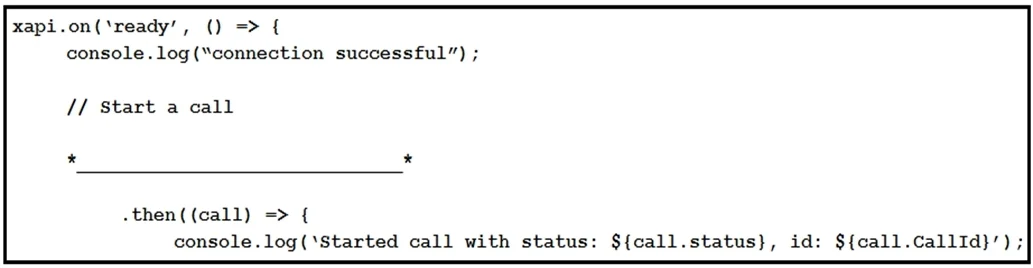
Refer to the exhibit. Assume that there is already a connection to a device for this jsxapi.code snippet. Which snippet completes the code so that the connected device makes a call to the user…
The correct answer is D. xapi.command('Dial', { Number: '[email protected]'}). In the jsxapi library (Cisco's JavaScript API for Webex/video room devices), the correct method to initiate a call is xapi.command('Dial', { Number: '<address>' }). The command name must be Dial - not Call (option B) or SIP (option C), as those are not valid jsxapi command…
Question
Exhibit
Options
- Axapi.command('Dial', { Endpoint: '[email protected]'})
- Bxapi.command('Call', { SIP: '[email protected]'})
- Cxapi.command('SIP', { Number: '[email protected]'})
- Dxapi.command('Dial', { Number: '[email protected]'})
How the community answered
(13 responses)- A15% (2)
- B8% (1)
- C8% (1)
- D69% (9)
Explanation
In the jsxapi library (Cisco's JavaScript API for Webex/video room devices), the correct method to initiate a call is xapi.command('Dial', { Number: '<address>' }). The command name must be Dial - not Call (option B) or SIP (option C), as those are not valid jsxapi command names. The parameter key must be Number - not Endpoint (option A). Option A uses the right command (Dial) but the wrong parameter name (Endpoint). Option D correctly combines Dial as the command with Number as the parameter key holding the SIP address.
Topics
Community Discussion
No community discussion yet for this question.