
300-920 · Question #20
Which REST API request is used to list all the Webex Room Kit devices within a large organization so that a new custom In-Room Control can be deployed on all the devices? A. B. C. D.
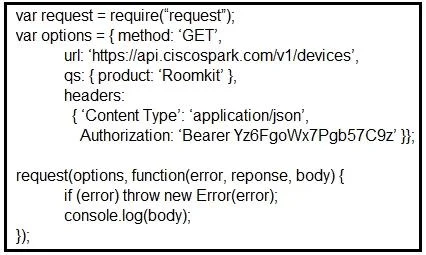
The correct answer is A. var request = require('request'); var options = { method: 'GET', url: 'https://api.ciscospark.com/v1/devices', qs: { product: 'Roomkit' }, headers: { 'Content Type': 'application/json', 'Authorization': 'Bearer Yz6FgoWx7Pgb57C9z' } }; request(options, function(error, reponse, body) { if (error) throw new Error(error); console.log(body); }). To list ALL Webex Room Kit devices across a large organization, you perform a GET request to https://api.ciscospark.com/v1/devices and filter by the product query parameter set to 'Roomkit'. Option A does exactly this - it queries the devices endpoint with only the product…
Question
Exhibits
Options
- Avar request = require('request'); var options = { method: 'GET', url: 'https://api.ciscospark.com/v1/devices', qs: { product: 'Roomkit' }, headers: { 'Content Type': 'application/json', 'Authorization': 'Bearer Yz6FgoWx7Pgb57C9z' } }; request(options, function(error, reponse, body) { if (error) throw new Error(error); console.log(body); });
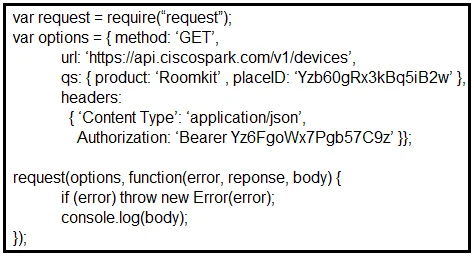
- Bvar request = require('request'); var options = { method: 'GET', url: 'https://api.ciscospark.com/v1/devices', qs: { product: 'RoomKit', placeId: 'YZB60gRx3kBq5iB2W' }, headers: { 'Content Type': 'application/json', 'Authorization': 'Bearer Yz6FgoWx7Pgb57C9z' } }; request(options, function(error, reponse, body) { if (error) throw new Error(error); console.log(body); });
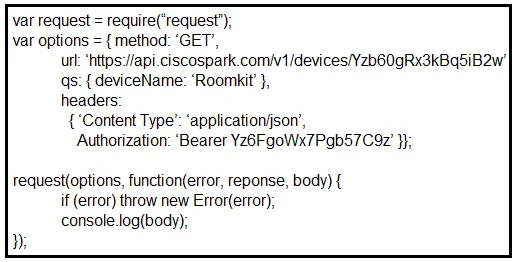
- Cvar request = require('request'); var options = { method: 'GET', url: 'https://api.ciscospark.com/v1/devices/YZB60gRx3kBq5iB2W', qs: { deviceName: 'Roomkit' }, headers: { 'Content Type': 'application/json', 'Authorization': 'Bearer Yz6FgoWx7Pgb57C9z' } }; request(options, function(error, reponse, body) { if (error) throw new Error(error); console.log(body); });
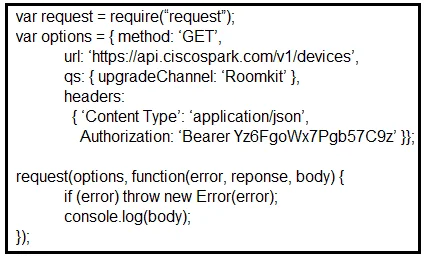
- Dvar request = require('request'); var options = { method: 'GET', url: 'https://api.ciscospark.com/v1/devices', qs: { upgradeChannel: 'Roomkit' }, headers: { 'Content Type': 'application/json', 'Authorization': 'Bearer Yz6FgoWx7Pgb57C9z' } }; request(options, function(error, reponse, body) { if (error) throw new Error(error); console.log(body); });
How the community answered
(61 responses)- A93% (57)
- B3% (2)
- C2% (1)
- D2% (1)
Explanation
To list ALL Webex Room Kit devices across a large organization, you perform a GET request to https://api.ciscospark.com/v1/devices and filter by the product query parameter set to 'Roomkit'. Option A does exactly this - it queries the devices endpoint with only the product filter, returning every Room Kit in the organization. Option B is incorrect because it adds a placeId, which would scope the results to a single room rather than the whole organization. Option C is incorrect because it targets a specific device ID in the URL path and uses the non-existent deviceName filter. Option D is incorrect because upgradeChannel is unrelated to filtering by product type.
Topics
Community Discussion
No community discussion yet for this question.