
300-835 · Question #70
Refer to the exhibit. Drag and drop the code snippets from the bottom onto the blanks in the code to construct a cURL command that edits an existing space to change the name to Annual Meeting. Not…
Explanation: Editing a Space with cURL Note: The exhibit and answer options appear to be missing from your question ({}). I'll explain the concept thoroughly based on what the question describes, which is likely from a Cisco DevNet or Webex API exam. --- Overall Goal The goal…
Question
Exhibit
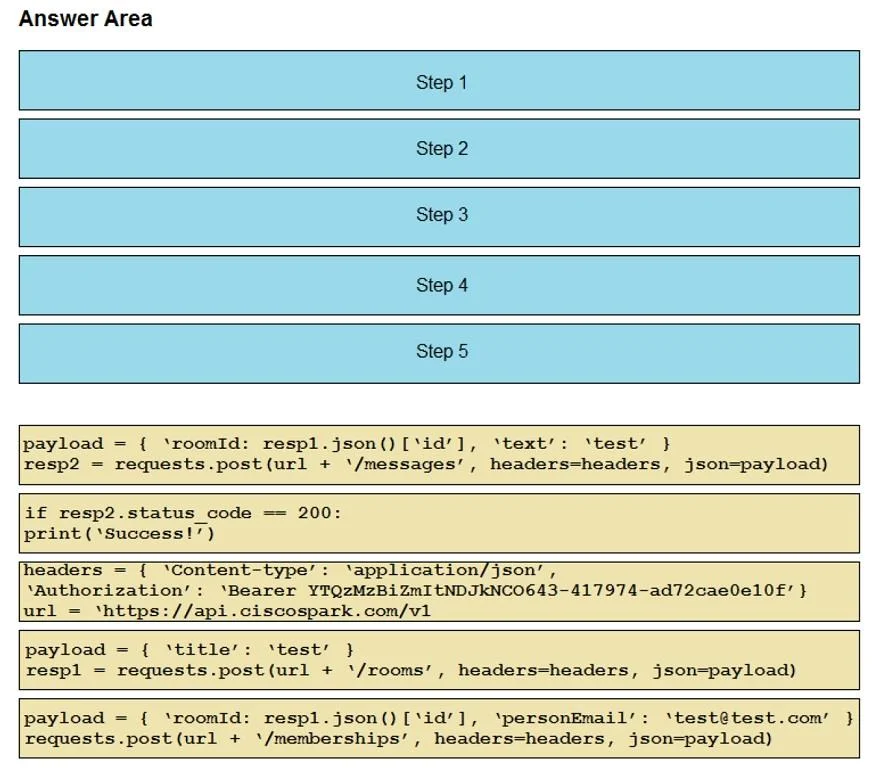
Explanation
Explanation: Editing a Space with cURL
Note: The exhibit and answer options appear to be missing from your question ({}). I'll explain the concept thoroughly based on what the question describes, which is likely from a Cisco DevNet or Webex API exam.
Overall Goal
The goal is to send an HTTP PUT or PATCH request to a REST API endpoint to update an existing space (room) resource. cURL is a command-line tool for making HTTP requests, and constructing it correctly requires specific components in the right order.
A correct cURL command to rename a space typically looks like:
curl -X PUT https://webexapis.com/v1/rooms/{roomId} \
  -H "Authorization: Bearer {your_token}" \
  -H "Content-Type: application/json" \
  -d '{"title": "Annual Meeting"}'
Why Each Part Is Necessary
| Component | Why It's Needed |
|---|---|
curl | Invokes the cURL tool to make the HTTP request |
-X PUT | Specifies the HTTP method. PUT/PATCH is used to update an existing resource, not create a new one (POST) or retrieve it (GET) |
The URL with {roomId} | Targets the specific existing space. Without the ID, the API doesn't know which space to edit |
-H "Authorization: Bearer ..." | Authenticates your request. The API rejects unauthorized calls with a 401 Unauthorized error |
-H "Content-Type: application/json" | Tells the server the request body format. Without this, the server may not parse the body correctly |
-d '{"title": "Annual Meeting"}' | The payload - the actual data being changed. This is where the new name is specified |
What Goes Wrong If Steps Are Skipped
- Wrong HTTP method (e.g., POST instead of PUT): Creates a new space instead of editing the existing one.
- Missing room ID in URL: API returns a
404or attempts to act on a collection rather than a single resource. - Missing Authorization header: Request fails with
401 Unauthorized. - Missing Content-Type header: Server may return
400 Bad Requestbecause it can't interpret the body. - Missing
-dbody: The space name won't change - the request succeeds but does nothing meaningful.
Memory Tip
Think of cURL as a letter: the -X flag is the action (PUT = update), the URL is the address, the -H headers are the envelope labels (who you are, what's inside), and -d is the message body.
When editing, always use PUT/PATCH + the resource ID + a JSON body with the fields to change.
If you can share the actual exhibit or answer options, I can give you the exact drag-and-drop mapping.
Topics
Community Discussion
No community discussion yet for this question.