
300-835 · Question #28
Drag and Drop Question. A small Python script is constructed that creates a Webex Meeting for John Doe scheduled for the current time. Drag and drop the code snippets at the bottom onto the areas of…
Explanation: Creating a Webex Meeting via Python Script > Note: The code snippet options appear to be missing from your question ({}). I'll explain the full procedure conceptually so you understand what each part should be and why - which is what the exam tests regardless of…
Question
Exhibits
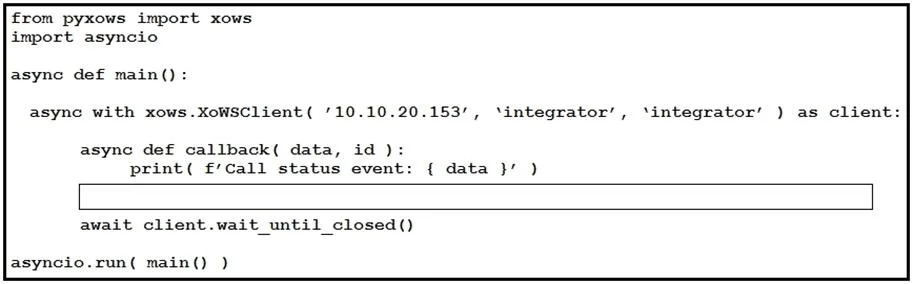
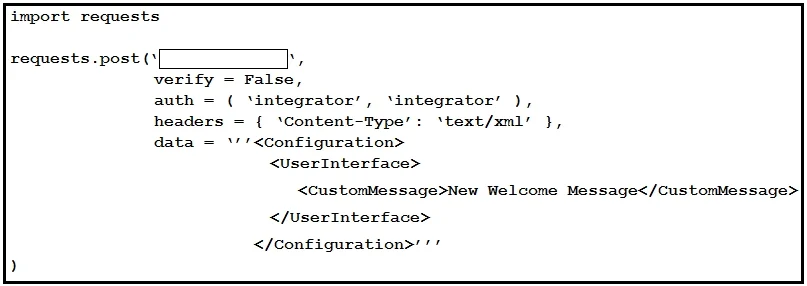
Explanation
Explanation: Creating a Webex Meeting via Python Script
Note: The code snippet options appear to be missing from your question (
{}). I'll explain the full procedure conceptually so you understand what each part should be and why - which is what the exam tests regardless of the specific drag-and-drop options.
Overall Goal
The script uses the Webex REST API to programmatically create a meeting. This is the correct approach because Webex exposes a POST /v1/meetings endpoint that accepts JSON, making it straightforward to automate meeting creation from a script without a UI.
Step-by-Step Breakdown
1. Import Libraries
import requests
import datetime
Why: requests handles HTTP calls to the Webex API. datetime generates the current time in the ISO 8601 format the API requires. Skipping either import causes a NameError at runtime.
2. Set the Authorization Header
headers = {
    "Authorization": "Bearer <your_access_token>",
    "Content-Type": "application/json"
}
Why: Every Webex API call requires a Bearer token for authentication. Without it, the API returns 401 Unauthorized. The Content-Type tells the server to expect JSON in the body.
3. Build the Meeting Payload
now = datetime.datetime.utcnow()
end_time = now + datetime.timedelta(hours=1)

payload = {
    "title": "Meeting with John Doe",
    "start": now.strftime("%Y-%m-%dT%H:%M:%S") + "Z",
    "end": end_time.strftime("%Y-%m-%dT%H:%M:%S") + "Z",
    "invitees": [{"email": "[email protected]"}]
}
Why: The API requires start and end in ISO 8601 UTC format. The invitees array associates John Doe with the meeting. If start is malformed or missing, the API returns 400 Bad Request.
4. POST to the Webex Meetings Endpoint
response = requests.post(
    "https://webexapis.com/v1/meetings",
    headers=headers,
    json=payload
)
Why: POST creates a new resource. Using json=payload automatically serializes the dict and sets the correct content-type. Using GET or PUT here would either retrieve or update - not create.
5. Handle the Response
print(response.json())
Why: A successful creation returns 200 OK or 201 Created with the meeting details (join link, meeting ID, etc.). Printing the response confirms success or reveals error messages for debugging.
What Goes Wrong Out of Order
| Skipped Step | Consequence |
|---|---|
No Authorization header | 401 Unauthorized |
No start/end time | 400 Bad Request |
| Wrong HTTP method (GET) | Returns meeting list, creates nothing |
No json=payload | Body sent as form data, API rejects it |
Memory Tip
Think of it as "IHAPR" - Import → Headers → Attributes (payload) → Post → Response. The order mirrors how any REST API call works: authenticate, describe what you want, send it, check the result.
If you can share the actual code snippet options from your exam, I can give you the precise drag-and-drop mapping.
Topics
Community Discussion
No community discussion yet for this question.