
300-820 · Question #63
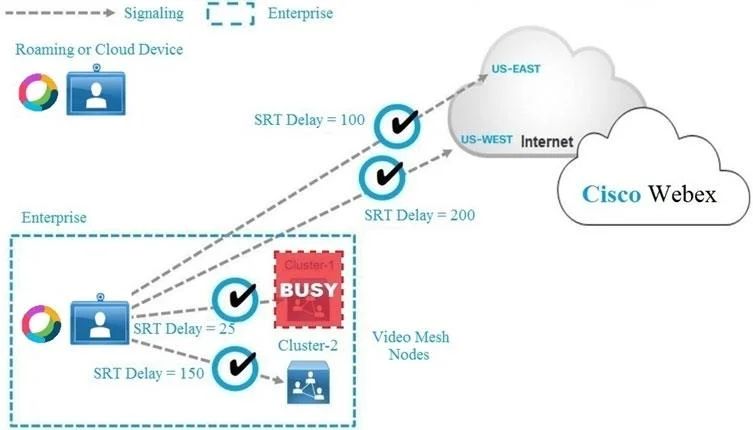
Refer to the exhibit. If the Webex Teams device cannot connect to Video Mesh Cluster-1 because it is busy, which media node does the Webex Teams device connect to next?
The correct answer is B. Video Mesh Cluster-2. Cisco Webex Video Mesh follows a preference order for media node selection: on-premises Video Mesh Nodes (VMN) are always preferred over cloud media nodes. When a device fails to connect to a VMN cluster (e.g., Video Mesh Cluster-1 is at capacity), it will attempt to connect to…
Question
Refer to the exhibit. If the Webex Teams device cannot connect to Video Mesh Cluster-1 because it is busy, which media node does the Webex Teams device connect to next?
Exhibit
Options
- ABoth Cloud Node US-EAST and US-WEST
- BVideo Mesh Cluster-2
- CCloud Node US-EAST
- DCloud Node US-WEST
How the community answered
(38 responses)- B95% (36)
- C3% (1)
- D3% (1)
Explanation
Cisco Webex Video Mesh follows a preference order for media node selection: on-premises Video Mesh Nodes (VMN) are always preferred over cloud media nodes. When a device fails to connect to a VMN cluster (e.g., Video Mesh Cluster-1 is at capacity), it will attempt to connect to the next available on-premises VMN cluster (Video Mesh Cluster-2) before falling back to cloud media nodes (US-EAST or US-WEST). This design keeps media traffic local to the organization's network as much as possible, reducing bandwidth usage on internet links and improving quality. Cloud nodes are only used as a last resort when no VMN cluster is available.
Topics
Community Discussion
No community discussion yet for this question.