
300-810 · Question #171
A collaboration engineer restored a failed primary node of an active/standby IM and presence subcluster with the server Recovery manager set to defaults. The engineer notices that the user is still…
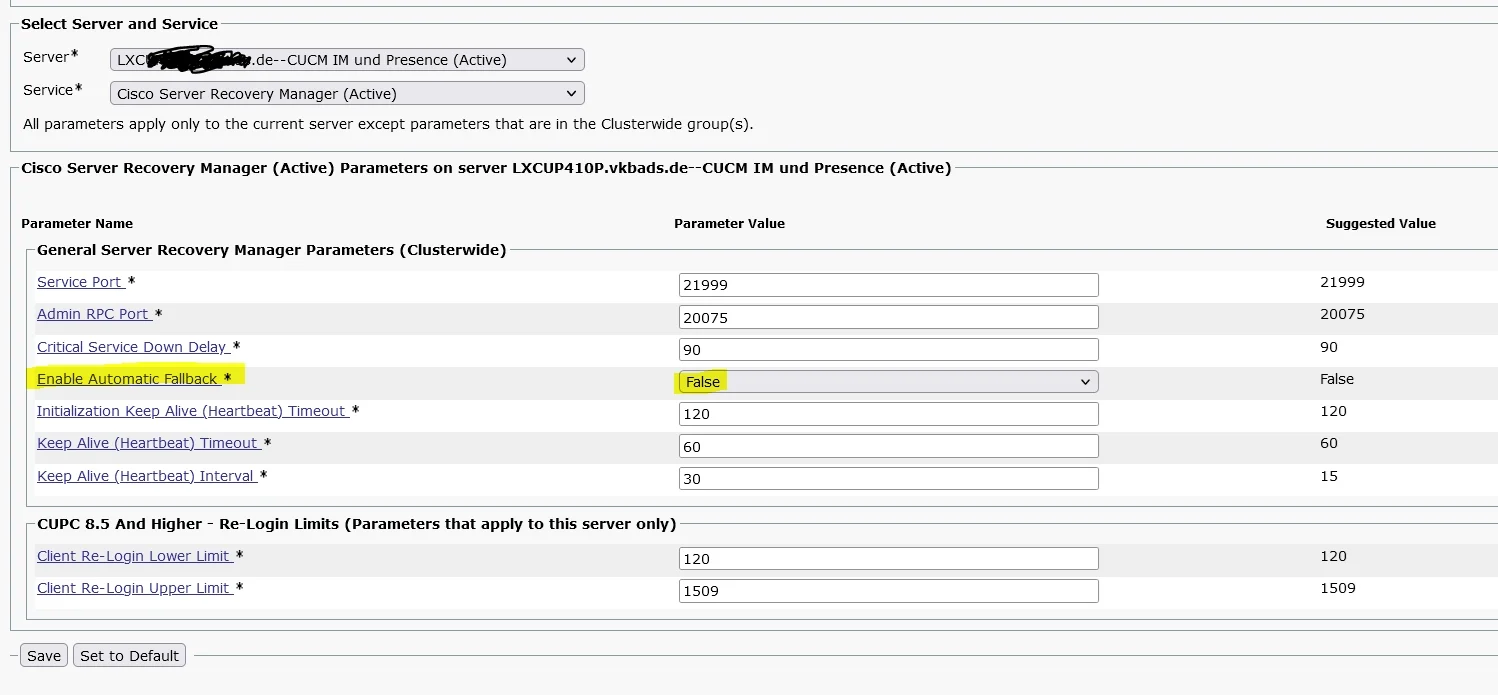
The correct answer is A. Select the Fallback button under Presence Redundancy Group Configuration. In Cisco IM and Presence (IM&P) high availability, the Recovery Manager controls how users fail back to the primary server after it is restored. By default, the Recovery Manager is set to 'Manual' mode, meaning automatic failback does NOT occur - an administrator must…
Question
A collaboration engineer restored a failed primary node of an active/standby IM and presence subcluster with the server Recovery manager set to defaults. The engineer notices that the user is still assigned to the secondary server. Which action resolves this issue?
Exhibit
Options
- ASelect the Fallback button under Presence Redundancy Group Configuration
- BWait for 30 minutes for automatic fallback to occur
- CModify the DNS SRV records to point back to the primary server
- DRestart the services on the primary server
How the community answered
(34 responses)- A76% (26)
- B15% (5)
- C6% (2)
- D3% (1)
Explanation
In Cisco IM and Presence (IM&P) high availability, the Recovery Manager controls how users fail back to the primary server after it is restored. By default, the Recovery Manager is set to 'Manual' mode, meaning automatic failback does NOT occur - an administrator must explicitly trigger it. The Fallback button on the Presence Redundancy Group Configuration page initiates the manual failback process, reassigning users from the secondary back to the primary server. Waiting 30 minutes would only apply if auto-fallback were enabled (non-default). DNS SRV records and service restarts alone do not cause user reassignment in this context.
Topics
Community Discussion
No community discussion yet for this question.