
300-740 · Question #75
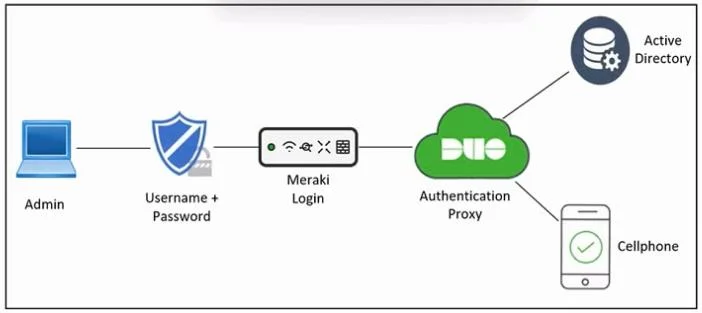
Drag and Drop Question Refer to the exhibit. An engineer must configure multifactor authentication using the Duo Mobile app to provide admin access to a Cisco Meraki switch. The engineer already…
The correct answer is Select a certificate enrollment object from FTD.; Generate CSR from FTD.; Obtain an identity certificate from the PKI CA server.; Import the identity certificate into FTD. Note on the Question The question stem mentions Duo Mobile/Meraki, but the actual items and answer are about PKI certificate enrollment on Cisco FTD (Firepower Threat Defense). Focus on the items and arrangement - the stem appears to be a copy-paste error from the source…
Question
Drag and Drop Question Refer to the exhibit. An engineer must configure multifactor authentication using the Duo Mobile app to provide admin access to a Cisco Meraki switch. The engineer already configured Duo Mobile and received an activation code. Drag and drop the steps from left to right to complete the configuration. Answer:
Exam Questions, Study Guides, Practice Tests. Lead the way to help you pass any IT Certification exams, 100% Pass Guaranteed or Full Refund. Especially Cisco, Microsoft, CompTIA, Citrix, EMC, HP, Oracle, VMware, Juniper, Check Point, LPI, Nortel, EXIN and so on. Our Slogan: First Test, First Pass. Help you to pass any IT Certification exams at the first try. You can reach us at any of the email addresses listed below. Any problems about IT certification or our products, you could rely upon us, we will give you satisfactory answers in 24 hours.
Exhibit
Answer Area
Drag items
Correct arrangement
- Select a certificate enrollment object from FTD.
- Generate CSR from FTD.
- Obtain an identity certificate from the PKI CA server.
- Import the identity certificate into FTD.
Explanation
Note on the Question
The question stem mentions Duo Mobile/Meraki, but the actual items and answer are about PKI certificate enrollment on Cisco FTD (Firepower Threat Defense). Focus on the items and arrangement - the stem appears to be a copy-paste error from the source.
Topic: PKI Identity Certificate Enrollment on FTD
This sequence describes how FTD obtains a signed identity certificate from a Certificate Authority (CA) using manual PKCS#10 / CSR enrollment.
Why This Order?
1. Select a certificate enrollment object from FTD
Why first: Before FTD can do anything, it needs to know which CA it's enrolling with and how (SCEP, manual, self-signed). A certificate enrollment object defines the CA's parameters (CA certificate, enrollment URL or method). You must select this object to establish the trust anchor before generating any request.
Common mistake: Trying to generate a CSR before defining where it's going. Without the enrollment object, FTD has no CA context to embed in the request.
2. Generate CSR from FTD
Why second: With the enrollment object selected, FTD generates a Certificate Signing Request (CSR) - a file containing FTD's public key and identity info, signed by FTD's private key. This CSR is what you send to the CA to prove ownership of the key pair.
Common mistake: Thinking you get the certificate directly here. The CSR is not a certificate - it's a request that must be approved by the CA.
3. Obtain an identity certificate from the PKI CA server
Why third: You submit the CSR to the CA (manually, via web portal, or out-of-band). The CA validates the request and issues a signed identity certificate. This step happens outside FTD - on the CA server itself.
Common mistake: Skipping to import without actually getting the signed cert from the CA. You cannot import what doesn't exist yet.
4. Import the identity certificate into FTD
Why last: Now that you have the signed certificate from the CA, you import it back into FTD to complete enrollment. FTD matches it to the pending CSR using the key pair it generated in step 2.
Common mistake: Importing the CA certificate here instead of the identity certificate, or importing before the CA has signed it.
Mental Model
FTD defines CA context → FTD generates key pair + CSR → CA signs CSR → FTD imports signed cert
This is the standard manual enrollment flow for any PKI system: configure trust, request, sign, install.
Topics
Community Discussion
No community discussion yet for this question.