
300-740 · Question #74
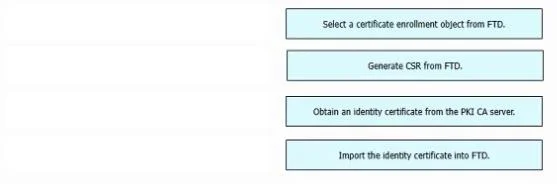
Drag and Drop Question An engineer must configure certificate-based authentication in a cloud-delivered Cisco Secure Firewall Management Center. Drag and drop the steps from left to right to…
The correct answer is Select a certificate enrollment object from FTD.; Generate CSR from FTD.; Obtain an identity certificate from the PKI CA server.; Import the identity certificate into FTD. Certificate Enrollment on Cisco FTD: Step-by-Step Explanation The Correct Order 1. Select a certificate enrollment object from FTD 2. Generate CSR from FTD 3. Obtain an identity certificate from the PKI CA server 4. Import the identity certificate into FTD --- Why This Order?…
Question
Drag and Drop Question An engineer must configure certificate-based authentication in a cloud-delivered Cisco Secure Firewall Management Center. Drag and drop the steps from left to right to manually enroll certificates on a Cisco Secure Firewall Threat Defense Virtual device. Answer:
Exhibit
Answer Area
Drag items
Correct arrangement
- Select a certificate enrollment object from FTD.
- Generate CSR from FTD.
- Obtain an identity certificate from the PKI CA server.
- Import the identity certificate into FTD.
Explanation
Certificate Enrollment on Cisco FTD: Step-by-Step Explanation
The Correct Order
1. Select a certificate enrollment object from FTD 2. Generate CSR from FTD 3. Obtain an identity certificate from the PKI CA server 4. Import the identity certificate into FTD
Why This Order?
Certificate enrollment follows a strict dependency chain - each step produces output that the next step requires.
Individual Placement Reasoning
Step 1 - Select a certificate enrollment object from FTD
Before anything else, FTD needs to know which CA it will be working with. A certificate enrollment object pre-defines the CA's details (URL, authentication method, CA certificate). This object is the configuration context for all subsequent steps. Without selecting it first, FTD has no CA target to generate a CSR for.
Common mistake: Skipping this and going straight to CSR generation. FTD requires the enrollment object to be associated before it can build the CSR with the correct CA fields.
Step 2 - Generate CSR from FTD
A Certificate Signing Request (CSR) is generated on the device using the device's private key (which FTD generates locally and keeps). The CSR contains the device's public key and identity information, signed by the private key. This CSR is what you submit to the CA - you cannot obtain a certificate without it.
Common mistake: Thinking you get the certificate first and then install it. The CA cannot issue a certificate until it receives and signs your CSR.
Step 3 - Obtain an identity certificate from the PKI CA server
You take the CSR output from Step 2 and submit it to the CA (manually, via web portal, SCEP, etc.). The CA validates the request, signs it, and issues an identity certificate. This step happens outside FTD - on the CA server. The result is a signed certificate file (usually .pem or .cer).
Common mistake: Confusing this with the CA certificate (the CA's own cert). What you receive here is the identity certificate issued specifically for your FTD device.
Step 4 - Import the identity certificate into FTD
Now that you have the signed certificate from the CA, you bring it back into FTD. FTD matches the certificate to the private key it generated in Step 2, completing the key pair. Only at this point does FTD have a fully functional identity certificate it can present during TLS/certificate-based authentication.
Common mistake: Trying to import before generating the CSR. The import will fail or produce a broken certificate because FTD won't have the matching private key.
Mental Model
Think of it like a passport application:
- Choose the issuing authority (enrollment object = selecting which government office)
- Fill out and submit the application (CSR = your application with your photo/biometrics)
- Authority processes and approves it (CA issues the certificate)
- Pick up your passport (import = receiving and activating it)
Topics
Community Discussion
No community discussion yet for this question.