
300-720 · Question #78
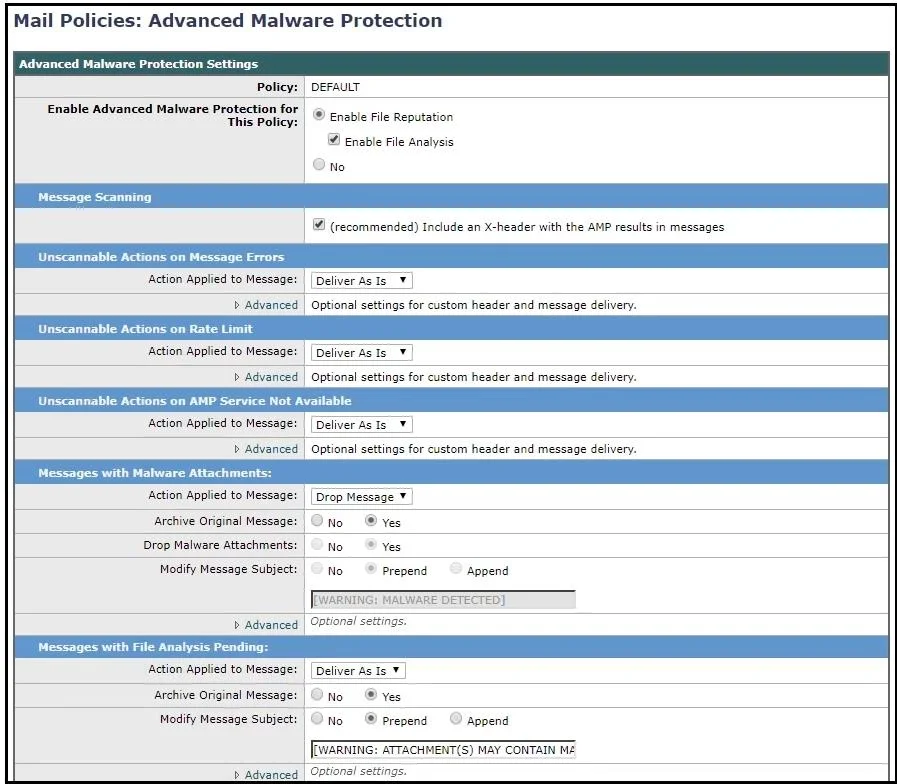
Refer to the exhibit. How should this configuration be modified to stop delivering Zero Day malware attacks?
The correct answer is B. Change File Analysis Pending action from Deliver As Is to Quarantine. Zero-day malware refers to threats that are new or unknown and not yet identified by traditional signature-based detection. The Cisco ESA's Advanced Malware Protection (AMP) feature can submit suspicious files to Cisco Threat Grid for dynamic sandboxing analysis. While a file…
Question
Refer to the exhibit. How should this configuration be modified to stop delivering Zero Day malware attacks?
Exhibit
Options
- AChange Unscannable Action from Deliver As Is to Quarantine.
- BChange File Analysis Pending action from Deliver As Is to Quarantine.
- CConfigure mailbox auto-remediation.
- DApply Prepend on Modify Message Subject under Malware Attachments.
How the community answered
(42 responses)- A2% (1)
- B76% (32)
- C14% (6)
- D7% (3)
Explanation
Zero-day malware refers to threats that are new or unknown and not yet identified by traditional signature-based detection. The Cisco ESA's Advanced Malware Protection (AMP) feature can submit suspicious files to Cisco Threat Grid for dynamic sandboxing analysis. While a file is awaiting sandbox analysis results, its verdict is pending. If the 'File Analysis Pending' action is set to 'Deliver As Is,' the ESA will deliver the email before the analysis completes, potentially allowing zero-day malware through. Changing this action to 'Quarantine' holds the message until the analysis verdict is returned, preventing delivery of potentially malicious content. Option A (Unscannable Action) handles files that cannot be scanned at all, which is a different scenario. Options C and D address remediation and notification, not pre-delivery blocking.
Topics
Community Discussion
No community discussion yet for this question.