
300-720 · Question #111
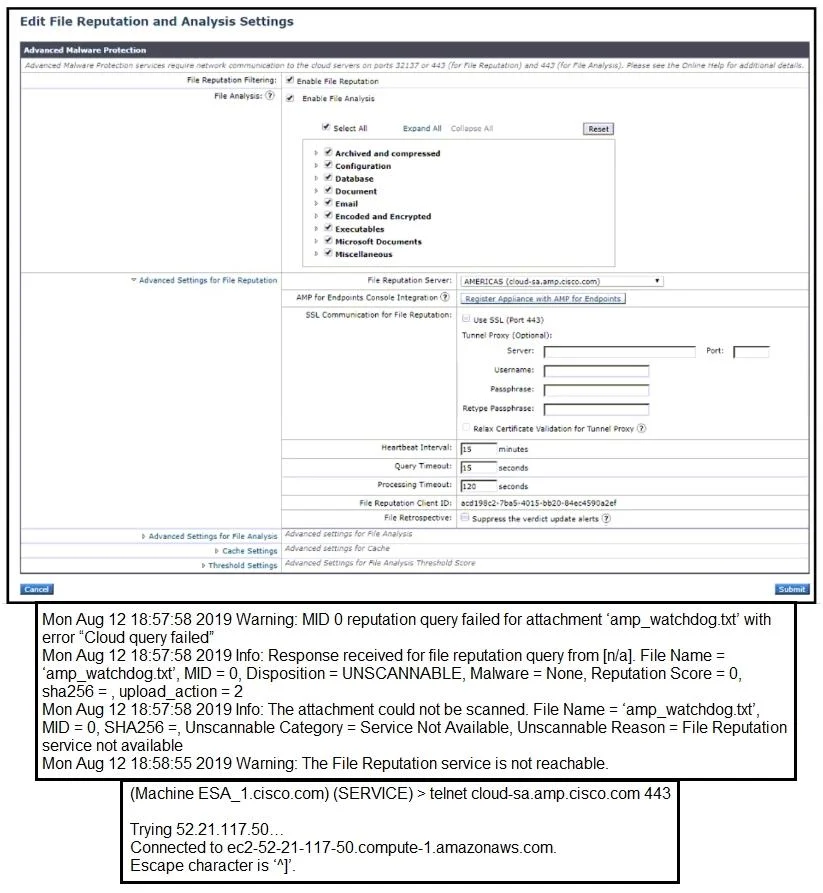
Refer to the exhibit. An administrator has configured File Reputation and File Analysis on the Cisco ESA; however, is does not function as expected. What must be configured on the Cisco ESA for this…
The correct answer is D. Configure the Cisco ESA to use SSL for the connection to the File Reputation server. Cisco ESA's File Reputation and File Analysis services communicate with Cisco's cloud-based Threat Grid and AMP (Advanced Malware Protection) infrastructure, which requires a secure SSL/TLS connection on port 443. If SSL is not enabled or properly configured for the connection…
Question
Refer to the exhibit. An administrator has configured File Reputation and File Analysis on the Cisco ESA; however, is does not function as expected. What must be configured on the Cisco ESA for this to function?
Exhibit
Options
- AUpload the Root CA certificate for the File Reputation cloud to the Cisco ESA.
- BOpen port 443 on the firewall for the Cisco ESA to connect to the File Reputation cloud.
- CRestart the File Reputation service to force the scanning engine to connect to the File Reputation
- DConfigure the Cisco ESA to use SSL for the connection to the File Reputation server.
How the community answered
(24 responses)- A4% (1)
- C4% (1)
- D92% (22)
Explanation
Cisco ESA's File Reputation and File Analysis services communicate with Cisco's cloud-based Threat Grid and AMP (Advanced Malware Protection) infrastructure, which requires a secure SSL/TLS connection on port 443. If SSL is not enabled or properly configured for the connection to the File Reputation server, the ESA cannot establish the required secure channel and the feature will not function. Uploading a Root CA certificate (A) would be needed if there were a certificate trust issue, and opening port 443 (B) addresses a firewall issue - but the exhibit context points to an SSL configuration problem on the ESA itself.
Topics
Community Discussion
No community discussion yet for this question.