
300-720 · Question #197
Drag and Drop Question An engineer must provide user access to the spam quarantine on a Cisco Secure Email Gateway. Users must be able to access the spam quarantine without additional authentication…
The correct answer is Go to Monitor page and select Spam Quarantine.; Enable End-User Quarantine Access.; Set the method used to authenticate users field to None.; Configure the message bodies to display before messages are released. The correct approach involves navigating to the spam quarantine settings, enabling end-user access, configuring authentication to 'None' for unauthenticated access via links, and then setting message body display for preview functionality without restoring messages.
Question
Exhibit
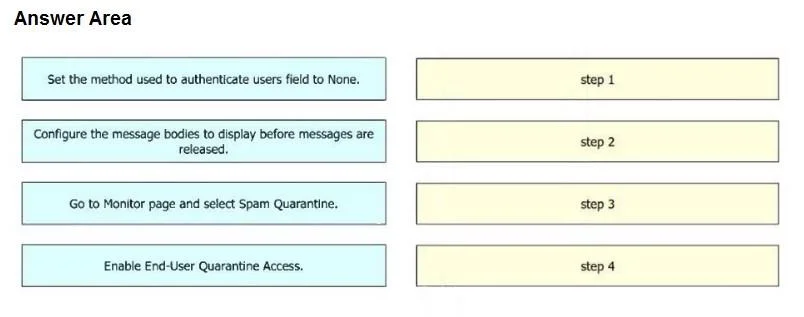
Answer Area
Drag items
Correct arrangement
- Go to Monitor page and select Spam Quarantine.
- Enable End-User Quarantine Access.
- Set the method used to authenticate users field to None.
- Configure the message bodies to display before messages are released.
Explanation
The correct approach involves navigating to the spam quarantine settings, enabling end-user access, configuring authentication to 'None' for unauthenticated access via links, and then setting message body display for preview functionality without restoring messages.
Approach. The sequence of actions must follow a logical flow for configuring end-user spam quarantine access on a Cisco Secure Email Gateway to meet the specified requirements:
- Go to Monitor page and select Spam Quarantine. This is the initial and necessary navigation step to reach the administrative section where end-user quarantine settings are managed. You cannot configure a feature without first accessing its control panel.
- Enable End-User Quarantine Access. After navigating to the correct section, this is the critical step to activate the end-user quarantine feature itself. Without enabling this, any subsequent configuration for end-user access will be ineffective.
- Set the method used to authenticate users field to None. This directly fulfills the requirement for users to access the spam quarantine 'without additional authentication by using links.' Setting authentication to 'None' ensures that users can simply click a link in their quarantine notification and access their quarantined messages directly, bypassing a login prompt.
- Configure the message bodies to display before messages are released. This directly addresses the requirement for users to 'preview a spam message from within the Spam Quarantine section without restoring the message.' By enabling the display of message bodies, users can view the content of a quarantined email within the web interface, providing the desired preview functionality without requiring them to release the message first. This setting is typically found within the end-user quarantine access configuration options.
Common mistakes.
- common_mistake. A common mistake is to attempt to configure specific settings like authentication or message display before enabling the overarching End-User Quarantine Access feature itself. The feature must be enabled first for its sub-settings to be applicable and functional. Additionally, an incorrect placement of the navigation step ('Go to Monitor page...') after configuration steps would represent an illogical workflow. Forgetting to configure one of the specific requirements, such as setting authentication to 'None' for unauthenticated access or enabling message body display for previews, would also result in an incomplete or incorrect solution.
Concept tested. Configuring Cisco Secure Email Gateway (formerly IronPort ESA) end-user spam quarantine access, including administrative navigation, feature enablement, authentication methods, and user experience settings such as message preview functionality.
Topics
Community Discussion
No community discussion yet for this question.