
300-720 · Question #195
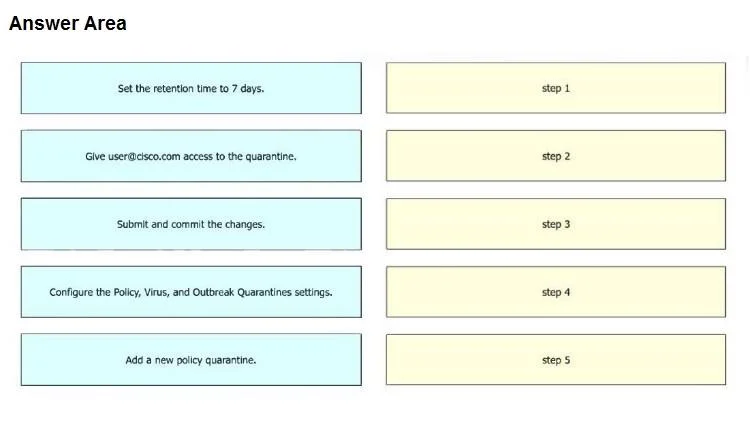
Drag and Drop Question An engineer must configure a policy quarantine in Cisco Secure Email Gateway. The retention time must be 7 days and [email protected] must have access to the quarantine. Drag and…
The correct answer is Configure the Policy, Virus, and Outbreak Quarantines settings.; Add a new policy quarantine.; Set the retention time to 7 days.; Give [email protected] access to the quarantine.; Submit and commit the changes. The correct sequence for configuring a policy quarantine in Cisco Secure Email Gateway involves navigating to the quarantine settings, adding a new quarantine, configuring its properties (retention and access), and finally submitting and committing the changes.
Question
Exhibit
Answer Area
Drag items
Correct arrangement
- Configure the Policy, Virus, and Outbreak Quarantines settings.
- Add a new policy quarantine.
- Set the retention time to 7 days.
- Give [email protected] access to the quarantine.
- Submit and commit the changes.
Explanation
The correct sequence for configuring a policy quarantine in Cisco Secure Email Gateway involves navigating to the quarantine settings, adding a new quarantine, configuring its properties (retention and access), and finally submitting and committing the changes.
Approach. The correct interaction is to drag the actions from the left panel to the right panel in the following sequence:
- Configure the Policy, Virus, and Outbreak Quarantines settings. - This is the initial and necessary navigation step to access the relevant configuration area within the Cisco Secure Email Gateway management interface.
- Add a new policy quarantine. - Before configuring any specific parameters for a policy quarantine, a new quarantine object must first be created.
- Set the retention time to 7 days. - Once the quarantine is created, its properties, such as the retention duration, can be configured. This directly addresses one of the requirements.
- Give [email protected] access to the quarantine. - Following the retention time, the access permissions for the quarantine can be configured, fulfilling the second requirement.
- Submit and commit the changes. - On most Cisco devices, especially security appliances, configuration changes made through the GUI or CLI must be explicitly submitted and committed for them to be saved and applied to the system. This is always the final step after completing all desired configurations.
Common mistakes.
- common_mistake. A common mistake would be to misorder the initial steps, such as trying to 'Add a new policy quarantine' or 'Set the retention time' before first navigating to the 'Configure the Policy, Virus, and Outbreak Quarantines settings'. Another frequent error is forgetting the 'Submit and commit the changes' step, which is crucial for applying and saving any configuration changes made on Cisco devices. Placing specific parameter configurations (retention, access) before creating the quarantine itself would also be incorrect, as you cannot configure properties for an object that doesn't exist yet. Reversing the order of 'Set the retention time to 7 days' and 'Give [email protected] access to the quarantine' might not be strictly 'wrong' from a technical perspective if both are part of creating the quarantine, but the provided solution has a specific order, and the overall flow (navigate -> create -> configure properties -> commit) is critical.
Concept tested. The core concept being tested is the administrator's understanding of the logical workflow and procedural steps for configuring policy quarantines on a Cisco Secure Email Gateway (formerly IronPort Email Security Appliance - ESA). This includes knowledge of navigation, object creation, property configuration, and the final commit process required on Cisco devices.
Topics
Community Discussion
No community discussion yet for this question.