
300-720 · Question #170
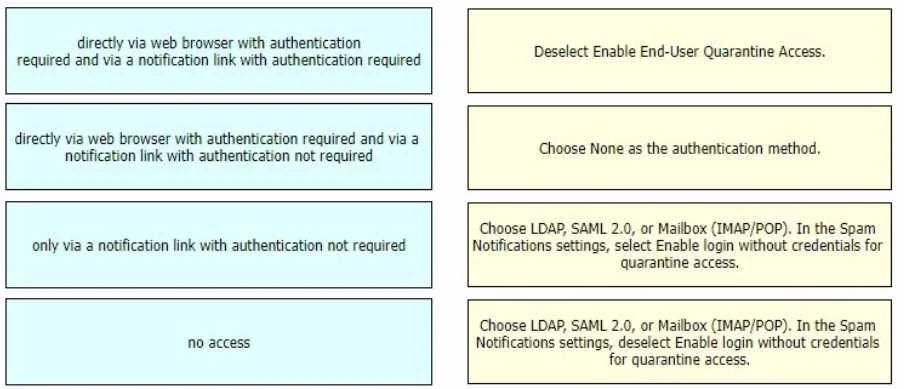
Drag and Drop Question Drag and drop authentication options for End-User Quarantine Access from the left onto the corresponding configuration steps on the right. Answer:
The correct answer is no access; only via a notification link with authentication not required; directly via web browser with authentication required and via a notification link with authentication not required; directly via web browser with authentication required and via a notification link with authentication required. This question tests the understanding of how to configure end-user quarantine access, distinguishing between authentication requirements for direct web browser access and access via notification links using various authentication methods.
Question
Exhibit
Answer Area
Drag items
Correct arrangement
- no access
- only via a notification link with authentication not required
- directly via web browser with authentication required and via a notification link with authentication not required
- directly via web browser with authentication required and via a notification link with authentication required
Explanation
This question tests the understanding of how to configure end-user quarantine access, distinguishing between authentication requirements for direct web browser access and access via notification links using various authentication methods.
Approach. To answer correctly, each access scenario on the left must be logically paired with the configuration step on the right that would produce that specific outcome:
- The access scenario 'no access' should be dragged to the configuration step 'Deselect Enable End-User Quarantine Access.' - Disabling the feature entirely prevents any access.
- The access scenario 'directly via web browser with authentication required and via a notification link with authentication required' should be dragged to the configuration step 'Choose LDAP, SAML 2.0, or Mailbox (IMAP/POP). In the Spam Notifications settings, deselect Enable login without credentials for quarantine access.' - Selecting a formal authentication method (LDAP/SAML/Mailbox) implies authentication for direct browser access. Deselecting 'Enable login without credentials' specifically mandates authentication for notification link access as well.
- The access scenario 'directly via web browser with authentication required and via a notification link with authentication not required' should be dragged to the configuration step 'Choose LDAP, SAML 2.0, or Mailbox (IMAP/POP). In the Spam Notifications settings, select Enable login without credentials for quarantine access.' - Choosing LDAP/SAML/Mailbox means direct browser access requires authentication. Selecting 'Enable login without credentials' allows users to access quarantine from a notification link without re-authenticating.
- The access scenario 'only via a notification link with authentication not required' should be dragged to the configuration step 'Choose None as the authentication method.' - If 'None' is chosen as the authentication method, it signifies that credentials are not required for quarantine access. This unauthenticated access is most commonly and securely facilitated through a specific, often time-limited, notification link, rather than allowing unauthenticated direct browser access to a generic portal.
Common mistakes.
- common_mistake. Common mistakes include misinterpreting the impact of 'Enable login without credentials for quarantine access' - selecting it means no authentication for notification links, while deselecting it means authentication is required. Another mistake is incorrectly assigning 'Choose None as the authentication method' to a scenario involving direct web browser access with authentication, or assuming 'None' allows direct browser access without any identification, which is typically not how secure systems manage quarantine access. Furthermore, confusing the 'no access' option with any form of authentication configuration is incorrect, as 'no access' is achieved by completely disabling the quarantine feature, overriding other authentication settings.
Concept tested. The core concept being tested is the configuration of end-user quarantine access and its various authentication mechanisms in email security platforms. This includes understanding different authentication methods (LDAP, SAML 2.0, Mailbox IMAP/POP), the implications of enabling/disabling unauthenticated access via notification links, and the overall effect of enabling or disabling the quarantine feature.
Topics
Community Discussion
No community discussion yet for this question.