
300-625 · Question #27
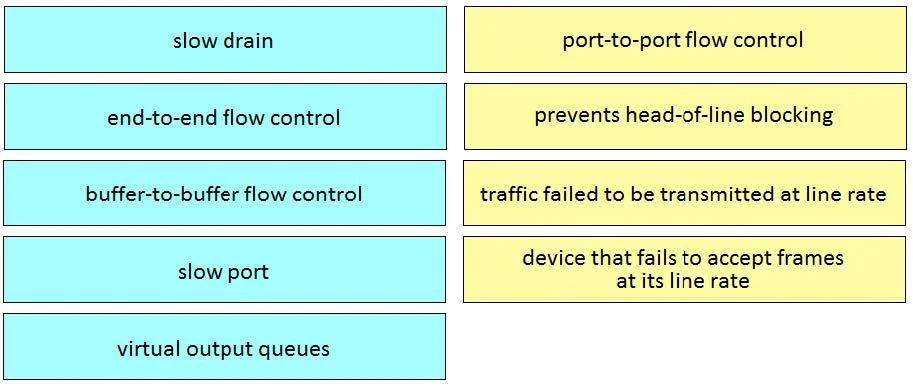
Drag and Drop Question Drag and drop the items from the left onto the correct descriptions on the right. Not all items are used. Answer:
The correct answer is Configure vFC interfaces.; Configure zones for multiple VSANs.; View the values for more than one switch at a time.; Display fabric extenders.; Use the End to End Connectivity Analysis tool to verify connections. Drag-and-Drop Explanation: Cisco DCNM Features Important caveat: The right-side target descriptions are not included in the question text, so this explanation focuses on the technical meaning of each item and why it belongs in its numbered position based on Cisco DCNM (Data…
Question
Drag and Drop Question Drag and drop the items from the left onto the correct descriptions on the right. Not all items are used. Answer:
Exhibit
Answer Area
Drag items
Correct arrangement
- Configure vFC interfaces.
- Configure zones for multiple VSANs.
- View the values for more than one switch at a time.
- Display fabric extenders.
- Use the End to End Connectivity Analysis tool to verify connections.
Explanation
Drag-and-Drop Explanation: Cisco DCNM Features
Important caveat: The right-side target descriptions are not included in the question text, so this explanation focuses on the technical meaning of each item and why it belongs in its numbered position based on Cisco DCNM (Data Center Network Manager) functionality.
Position 1: Configure vFC interfaces
vFC (Virtual Fibre Channel) interfaces are the mechanism for running Fibre Channel traffic over Ethernet (FCoE). This is a configuration task requiring dedicated interface management within DCNM. It goes first because interface configuration is foundational - you must establish vFC interfaces before zoning or connectivity verification can occur.
Common mistake: Confusing vFC with standard Ethernet interfaces. vFC interfaces are logical, bound to physical/port-channel interfaces, and only relevant in FCoE environments.
Position 2: Configure zones for multiple VSANs
Zoning across multiple VSANs is a DCNM-specific capability called Enhanced Zoning. Standard Fibre Channel Fabric Manager limits zone configuration to one VSAN at a time; DCNM's bulk zoning feature allows simultaneous configuration across many VSANs.
Common mistake: Assuming standard FC switch CLI can do this natively - it cannot at scale. This is a DCNM value-add feature.
Position 3: View the values for more than one switch at a time
This refers to DCNM's Summary View or bulk monitoring capability. DCNM aggregates telemetry across the entire fabric, letting administrators view counters, states, and statistics from multiple switches in a single pane - something the individual switch CLI cannot do.
Common mistake: Thinking SSH to each switch individually accomplishes the same thing at scale. DCNM centralizes this visibility.
Position 4: Display fabric extenders
Fabric Extenders (FEX) - such as Cisco Nexus 2000 series - are satellites that extend a parent Nexus switch's capabilities. DCNM can discover and display FEX topology and status within the fabric view.
Common mistake: Treating FEX as standalone switches. They have no independent management plane; they appear as line cards of the parent switch, and DCNM reflects this dependency in its topology display.
Position 5: Use the End to End Connectivity Analysis tool to verify connections
The E2E Connectivity Analysis tool is a DCNM troubleshooting utility that traces a path between two endpoints (initiator to target) across the SAN fabric, verifying zoning, login state, and physical connectivity. It belongs last because it is a verification step performed after configuration is complete.
Common mistake: Using this tool before zones/interfaces are configured, then misinterpreting "no path found" as a tool error rather than a configuration gap.
Key Takeaway
The arrangement follows a logical configure → scale → monitor → display → verify workflow within Cisco DCNM, progressing from granular interface config through fabric-wide visibility and ending with troubleshooting validation.
Topics
Community Discussion
No community discussion yet for this question.