
300-625 · Question #28
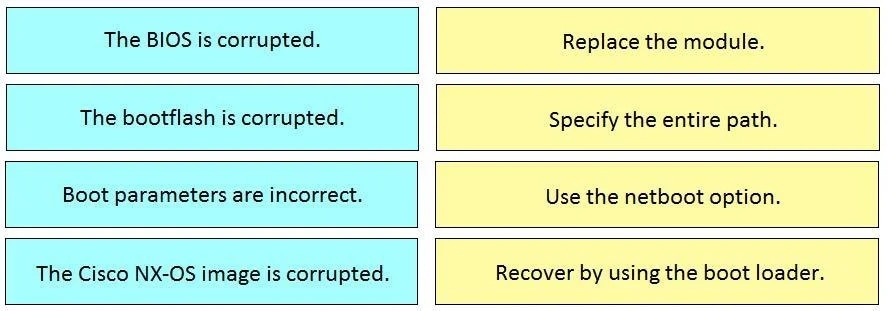
Drag and Drop Question Drag and drop the boot issues from the left onto the correct solutions on the right. Answer:
The correct answer is The BIOS is corrupted.; Boot parameters are incorrect.; The bootflash is corrupted.; The Cisco NX-OS image is corrupted. Cisco NX-OS Boot Issues - Drag-and-Drop Explained > Note: The question as provided only shows the boot issues, not the right-side solution targets. The "correct arrangement" reflects the order in which these issues occur during the Cisco NX-OS boot sequence, which is the…
Question
Drag and Drop Question Drag and drop the boot issues from the left onto the correct solutions on the right. Answer:
Exhibit
Answer Area
Drag items
Correct arrangement
- The BIOS is corrupted.
- Boot parameters are incorrect.
- The bootflash is corrupted.
- The Cisco NX-OS image is corrupted.
Explanation
Cisco NX-OS Boot Issues - Drag-and-Drop Explained
Note: The question as provided only shows the boot issues, not the right-side solution targets. The "correct arrangement" reflects the order in which these issues occur during the Cisco NX-OS boot sequence, which is the logical basis for matching them to solutions.
The Boot Sequence Logic
The ordering follows the Cisco Nexus boot process from hardware up to OS:
BIOS → Boot Parameters → Bootflash → NX-OS Image
Address issues in the order they're encountered during boot.
Item-by-Item Breakdown
1. The BIOS is corrupted
Why first: BIOS is the lowest-level firmware - it initializes hardware before anything else runs. If BIOS is corrupted, the device cannot POST or proceed at all. This is the earliest possible failure point.
- Solution path: Requires ROMMON recovery or hardware-level intervention.
2. Boot parameters are incorrect
Why second: After BIOS initializes hardware, the system reads boot variables (e.g., boot nxos bootflash:/...) stored in NVRAM/startup-config to know what to load and from where. Wrong parameters mean the loader doesn't know where to find the image.
- Solution path: Fix via
boot nxoscommand in ROMMON or config mode.
3. The bootflash is corrupted
Why third: Once valid boot parameters exist and point to bootflash, the system tries to access bootflash. A corrupted filesystem means the image can't be read even if it's there.
- Solution path:
init systemor format/reformat bootflash, then re-copy image.
4. The Cisco NX-OS image is corrupted
Why last: This is the final step - bootflash is accessible, parameters point to the image, but the image file itself is bad (failed checksum, incomplete copy, etc.).
- Solution path: Copy a known-good image via TFTP/USB in ROMMON.
Common Mistakes
| Misconception | Reality |
|---|---|
| Swapping bootflash and boot parameters | Boot params are checked before bootflash is accessed - you need a valid pointer before you can read the filesystem |
| Treating BIOS and NX-OS image as interchangeable | BIOS is hardware-level; NX-OS is software-level - they're at opposite ends of the boot chain |
| Thinking image corruption = bootflash corruption | Bootflash can be healthy while a specific image file is corrupt (and vice versa) |
The key mental model: each layer must work before the next can be attempted.
Topics
Community Discussion
No community discussion yet for this question.