
300-620 · Question #178
Refer to the exhibit. The EPG-100 must be extended to the vCenter as a port group with a tagged VLAN ID of 100. Which set of actions accomplishes this goal?
The correct answer is C. Define a dynamic VLAN range (from 100-200) under a VLAN pool that is associated with the del. To extend an EPG to vCenter as a port group, a dynamic VLAN range within a VLAN pool must be defined and associated with a Virtual Machine Manager (VMM) domain.
Question
Refer to the exhibit. The EPG-100 must be extended to the vCenter as a port group with a tagged VLAN ID of 100. Which set of actions accomplishes this goal?
Exhibit
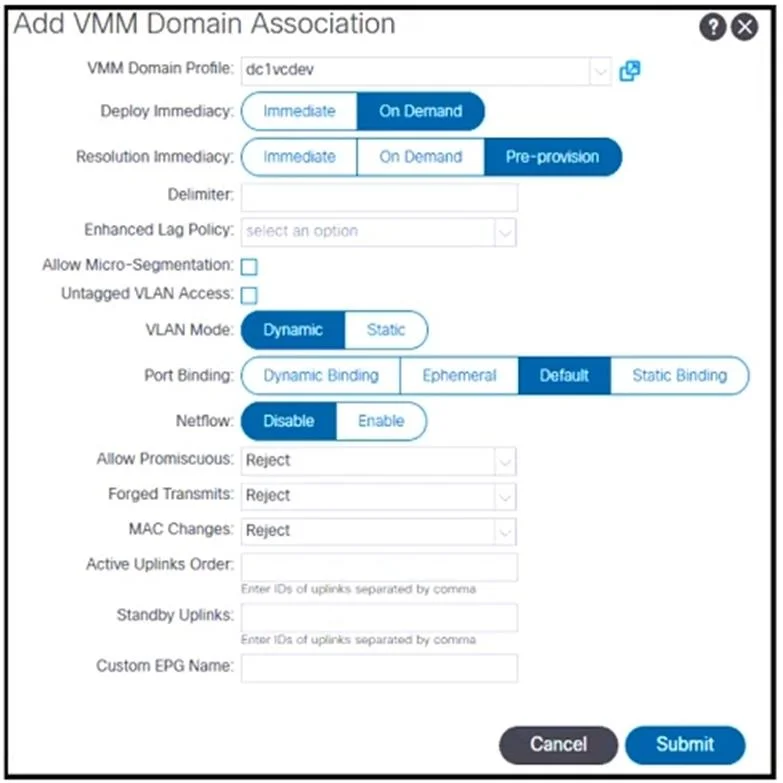
Options
- ADefine a static VLAN range (from 100-200) under a VLAN pool that is associated with the
- BDefine a static VLAN range (from 100-200) under a VLAN pool that is associated with the
- CDefine a dynamic VLAN range (from 100-200) under a VLAN pool that is associated with the del
- DDefine a dynamic VLAN range (from 100-200) under a VLAN pool that is associated with the
How the community answered
(59 responses)- A5% (3)
- B3% (2)
- C81% (48)
- D10% (6)
Why each option
To extend an EPG to vCenter as a port group, a dynamic VLAN range within a VLAN pool must be defined and associated with a Virtual Machine Manager (VMM) domain.
Static VLAN ranges are typically used for physical domains (bare-metal servers) or L2Outs, not for automated VMM domain integration.
Static VLAN ranges are typically used for physical domains or L2Outs, not for automated VMM domain integration, where ACI dynamically assigns VLANs.
For ACI to automatically create and manage port groups in vCenter for an EPG, it requires a VMM domain with a dynamic VLAN pool. ACI then dynamically allocates VLAN IDs from this pool to the port groups it provisions in vCenter, extending the EPG's network to the virtual environment.
While a dynamic VLAN range is required for VMM integration, if it were associated with a Physical Domain instead of a VMM Domain, ACI would not be able to push port group configurations to vCenter.
Concept tested: Cisco ACI VMM domain and dynamic VLANs
Source: https://www.cisco.com/c/en/us/td/docs/dcn/aci/apic/6x/config-guides/vmm/cisco-aci-virtual-machine-manager-configuration-guide-60x/m_vmm.html
Topics
Community Discussion
No community discussion yet for this question.