
300-615 · Question #270
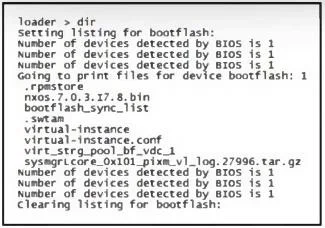
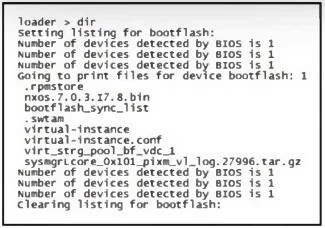
Refer to the exhibit. An engineer fails to load the Cisco Nexus 9000 Series Switch to configuration mode. Which command set resolves the issue?
The correct answer is A. Loader > boot nxos.7.0.3.I7.8.bin. The error suggests that the system is in loader mode because it failed to load the correct NX-OS To resolve this issue, you need to boot the switch using the correct NX-OS image from the bootflash. The command boot nxos.7.0.3.I7.8.bin will load the correct image. After booting…
Question
Refer to the exhibit. An engineer fails to load the Cisco Nexus 9000 Series Switch to configuration mode. Which command set resolves the issue?
Exhibits
Options
- ALoader > boot nxos.7.0.3.I7.8.bin
- BLoader > boot bootflash:bootflash_sync_list
- CLoader > boot nxos.7.0.3.I7.8.bin
- DLoader > boot nxos.7.0.3.I7.8.bin
How the community answered
(42 responses)- A79% (33)
- B7% (3)
- C12% (5)
- D2% (1)
Explanation
The error suggests that the system is in loader mode because it failed to load the correct NX-OS To resolve this issue, you need to boot the switch using the correct NX-OS image from the bootflash. The command boot nxos.7.0.3.I7.8.bin will load the correct image. After booting, you should ensure that the correct NX-OS image is set in the boot configuration, using boot bootflash:nxos.7.0.3.I7.8.bin, and save the configuration with copy run start to prevent this from happening again on the next reboot.
Topics
Community Discussion
No community discussion yet for this question.