
300-615 · Question #269
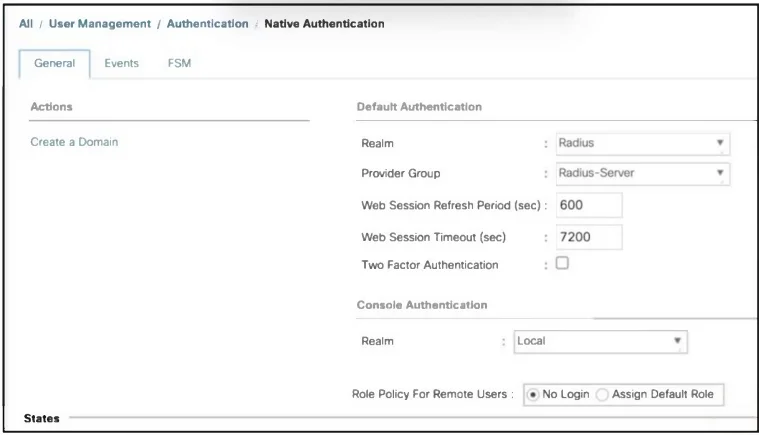
Refer to the exhibit. The user that was created on the RADIUS server does not have read-only access to the Cisco UCS Manager GUL. Also, the role for the user has not been configured inside Cisco UCS…
The correct answer is C. Change the Role Policy for Remote User to Assign Default Role. The issue is that the user authenticated via RADIUS does not have a role assigned within Cisco UCS Manager. In this case, the setting for Role Policy for Remote Users is set to "No Login," which prevents the user from being assigned a role. To grant the user read-only access…
Question
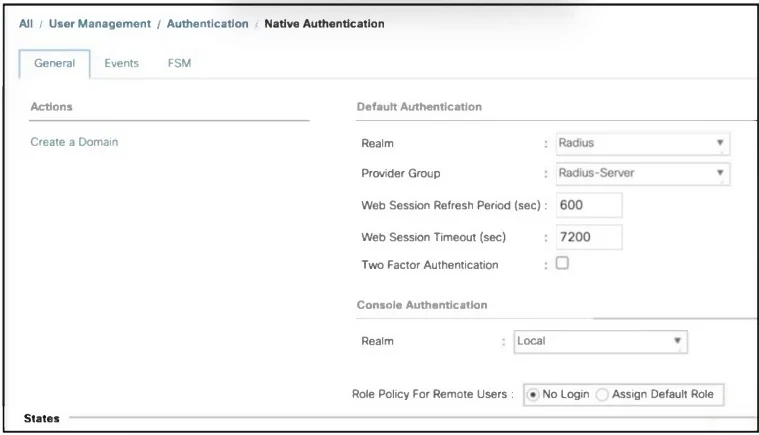
Refer to the exhibit. The user that was created on the RADIUS server does not have read-only access to the Cisco UCS Manager GUL. Also, the role for the user has not been configured inside Cisco UCS Manager. Which action must be taken inside Cisco UCS Manager to grant read-only access to the user?
Exhibits
Options
- AChange the provider group from Radius-Server to Local.
- BChange the Console Authentication Realm to RADIUS.
- CChange the Role Policy for Remote User to Assign Default Role.
- DChange the Default Authentication Realm to read-only.
How the community answered
(28 responses)- B4% (1)
- C86% (24)
- D11% (3)
Explanation
The issue is that the user authenticated via RADIUS does not have a role assigned within Cisco UCS Manager. In this case, the setting for Role Policy for Remote Users is set to "No Login," which prevents the user from being assigned a role. To grant the user read-only access, you should change the Role Policy for Remote User to Assign Default Role. This ensures that users authenticated through RADIUS can be assigned a default role within Cisco UCS Manager, such as read-only.
Topics
Community Discussion
No community discussion yet for this question.