
300-540 · Question #67
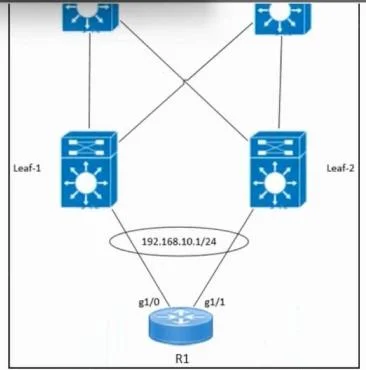
Refer to the exhibit. An engineer must configure EVPN port-active multihoming on router R1. Which command must be run against the g1/0 and g1/1 interfaces on R1 to complete the physical Ethernet…
The correct answer is D. bundle id 1 mode active. From Cisco's EVPN VXLAN multihoming design requirements, port-active multihoming uses a single LAG (EtherChannel / Bundle-Ether) between the host/router and the pair of leaf switches. All physical interfaces participating in that bundle must be configured with: bundle id…
Question
Refer to the exhibit. An engineer must configure EVPN port-active multihoming on router R1. Which command must be run against the g1/0 and g1/1 interfaces on R1 to complete the physical Ethernet bundle for multihoming on a host named Host-1?
Exhibit
Options
- Aevpn ethernet-segment 1
- Bswitchport mode trunk
- Cencapsulation dot1q 1
- Dbundle id 1 mode active
How the community answered
(20 responses)- A15% (3)
- B5% (1)
- C5% (1)
- D75% (15)
Explanation
From Cisco's EVPN VXLAN multihoming design requirements, port-active multihoming uses a single LAG (EtherChannel / Bundle-Ether) between the host/router and the pair of leaf switches. All physical interfaces participating in that bundle must be configured with: bundle id <number> mode active Associates the physical interfaces (g1/0 and g1/1) with Bundle-Ether1. Uses LACP active mode, which is required for EVPN port-active multihoming. Enables the host-facing port-channel required to support EVPN multihomed connectivity. In the exhibit, R1 already has: interface Bundle-Ether1 description "Bundle to Leaf-1" interface Bundle-Ether1.10 ip address 192.168.10.1 255.255.255.0 This confirms that the engineer intends to bundle g1/0 and g1/1 together into Bundle-Ether1, and the missing step is adding the interfaces into that bundle. The correct configuration is: bundle id 1 mode active bundle id 1 mode active
Topics
Community Discussion
No community discussion yet for this question.