
300-515 · Question #140
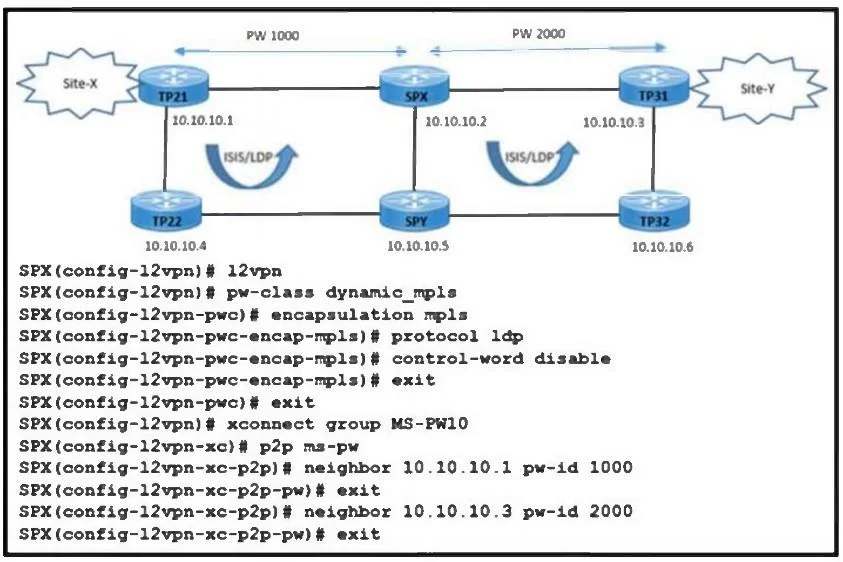
Refer to the exhibit. A customer reported that traffic is failing to pass between Site-X and Site-Y. The network engineer already verified that the connectivity between IS-IS and LDP is up from TP21…
The correct answer is D. Configure SPX with the pw-class dynamic_mpls command under xconnect group MS-PW10. In an MPLS Layer 2 VPN, the pseudowire-class must be explicitly bound to the xconnect group so that all pseudowire parameters (encapsulation, signaling protocol, control-word setting) are applied to the neighbors. In the given configuration, the pw-class dynamic_mpls was…
Question
Refer to the exhibit. A customer reported that traffic is failing to pass between Site-X and Site-Y. The network engineer already verified that the connectivity between IS-IS and LDP is up from TP21 to TP31. PW 1000 and PW 2000 are configured with SPX. Which action must the engineer take to resolve the issue?
Exhibit
Options
- AEnable control-word under the pw-class configuration on SPX.
- BEnable preferred-path interface tunnel under the pw-class configuration on SPX.
- CConfigure neighbor 10.10.10.1 pw-id 1000 under a different xconnect group name.
- DConfigure SPX with the pw-class dynamic_mpls command under xconnect group MS-PW10
How the community answered
(47 responses)- A23% (11)
- B6% (3)
- C15% (7)
- D55% (26)
Explanation
In an MPLS Layer 2 VPN, the pseudowire-class must be explicitly bound to the xconnect group so that all pseudowire parameters (encapsulation, signaling protocol, control-word setting) are applied to the neighbors. In the given configuration, the pw-class dynamic_mpls was defined but never associated under the xconnect group MS-PW10. Applying the pw-class dynamic_mpls under the xconnect ensures the pseudowires (PW 1000 and PW 2000) come up and traffic passes between Site-X and Site-Y.
Topics
Community Discussion
No community discussion yet for this question.