
300-510 · Question #239
Refer to the exhibit. A service provider is running IS-IS in the core, and all routers use the default IS-IS configuration and reside in the same area. All routers maintain a different 6 bytes for…
The correct answer is D. Configure all routers to operate as IS-IS Level 2 routers so that only a Level 2 database is. In IS-IS, a router operating as Level 1-2 (the default) maintains both a Level 1 (intra-area) and Level 2 (inter-area/backbone) link-state database. The 'attached bit' in a router's LSP signals to Level 1 routers that this L1/L2 router can reach the Level 2 backbone. The…
Question
Refer to the exhibit. A service provider is running IS-IS in the core, and all routers use the default IS-IS configuration and reside in the same area. All routers maintain a different 6 bytes for the system ID, but the attached bits in the NET are the same. After an engineer added router R6 to the network, R3 and RS began to experience CPU processing issues. Which action must the engineer take to resolve the issue?
Exhibit
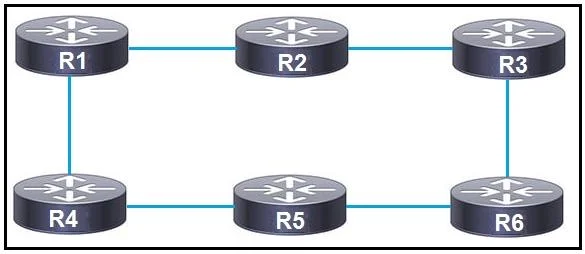
Options
- AConfigure all routers to operate as IS-IS Level 1 routers by altering the attached bit to ensure that
- BConfigure routers RS and R3 to operate as Level 1 routers only so that they inject a default
- CConfigure R6 to operate as a Level 1 router only so that it maintains the Level 1 database for all
- DConfigure all routers to operate as IS-IS Level 2 routers so that only a Level 2 database is
How the community answered
(23 responses)- A17% (4)
- B9% (2)
- C4% (1)
- D70% (16)
Explanation
In IS-IS, a router operating as Level 1-2 (the default) maintains both a Level 1 (intra-area) and Level 2 (inter-area/backbone) link-state database. The 'attached bit' in a router's LSP signals to Level 1 routers that this L1/L2 router can reach the Level 2 backbone. The problem states that all routers have the same attached bit setting, meaning all are operating as L1/L2 by default. When router R6 was added, it introduced more L1/L2 routers, increasing LSP flooding in the Level 1 domain and causing CPU issues on R3 and RS due to excessive SPF calculations triggered by the larger, constantly updating L1 database. The solution is to configure all routers as Level 2 only. This eliminates the Level 1 database entirely - there is only a single Level 2 database, reducing flooding, SPF frequency, and CPU load. Options A and B involve partial solutions that don't eliminate the underlying L1 database overhead. Option C only changes R6, which doesn't resolve the systemic issue.
Topics
Community Discussion
No community discussion yet for this question.