
2V0-622 · Question #207
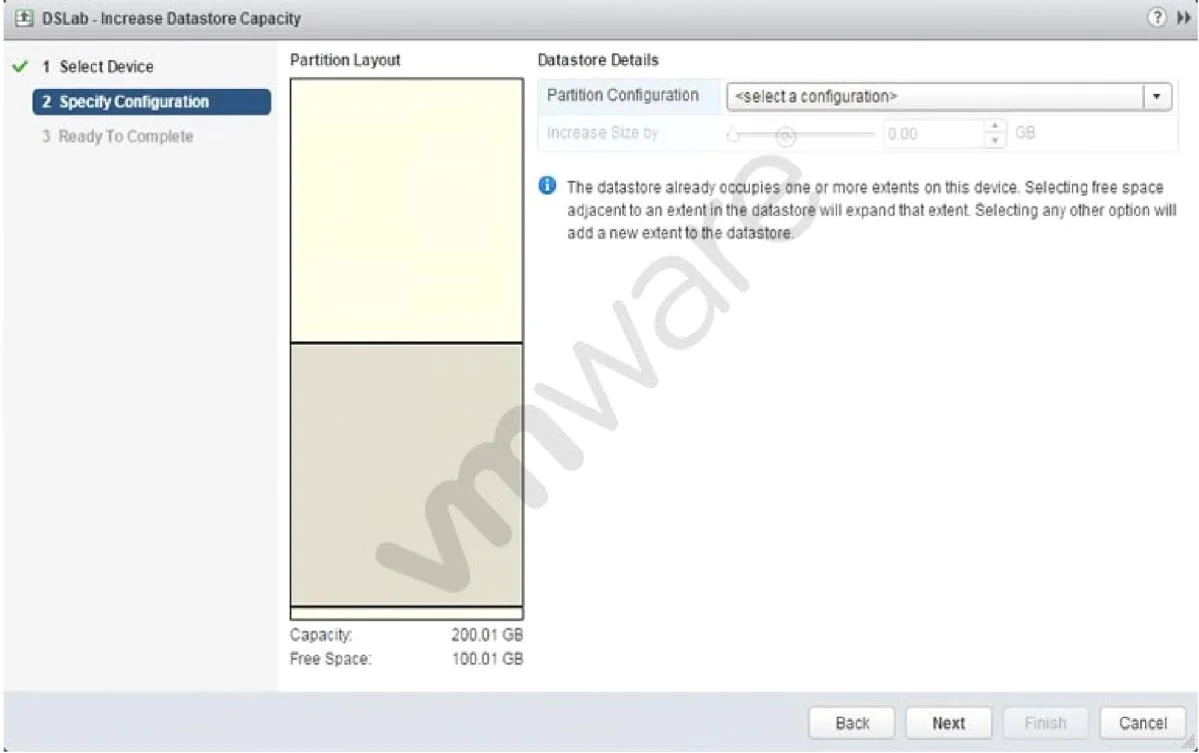
Refer to the Exhibit. An administrator wants to increase the capacity of a VMFS5 datastore; but the Increase Size by s lider is not available, as shown in the Exhibit. How should the administrator…
The correct answer is A. Select a valid partition configuration from the drop-down menu. The 'Increase Size by' slider is unavailable because no valid partition configuration has been selected from the drop-down, which must be chosen before the slider activates.
Question
Refer to the Exhibit. An administrator wants to increase the capacity of a VMFS5 datastore; but the Increase Size by s lider is not available, as shown in the Exhibit. How should the administrator resolve this problem?
Exhibit
Options
- ASelect a valid partition configuration from the drop-down menu.
- BUse fdisk utility to manually resize the partition.
- CUse the mouse to resize the partition indicated in the Partition Layout.
- DClicking Next will prompt for available usable space.
How the community answered
(63 responses)- A75% (47)
- B14% (9)
- C3% (2)
- D8% (5)
Why each option
The 'Increase Size by' slider is unavailable because no valid partition configuration has been selected from the drop-down, which must be chosen before the slider activates.
In the vSphere VMFS datastore expansion wizard, the slider for specifying additional space only becomes active after the administrator selects a valid partition from the drop-down menu; without that selection, the UI element remains disabled and no size adjustment is possible.
fdisk is a Linux command-line partitioning tool that operates outside vSphere and is not a supported method for expanding a VMFS datastore managed by ESXi.
The Partition Layout diagram in the wizard is a read-only visual representation and does not support direct mouse-drag resizing of partitions.
Clicking Next without selecting a valid partition configuration will not prompt for usable space; it will either error or proceed with no valid partition to expand.
Concept tested: VMFS5 datastore expansion partition configuration
Source: https://docs.vmware.com/en/VMware-vSphere/7.0/com.vmware.vsphere.storage.doc/GUID-D57FEF5D-75F1-433D-B337-B0B197B7D4A5.html
Topics
Community Discussion
No community discussion yet for this question.