
2V0-621 · Question #207
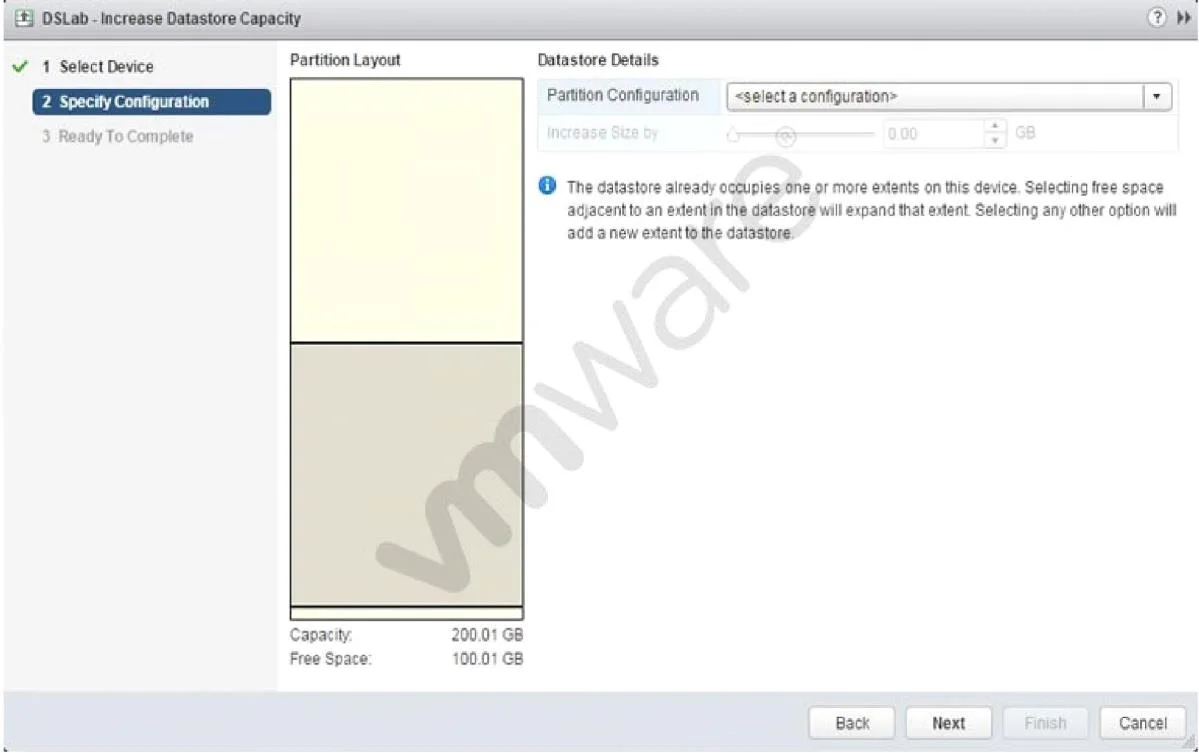
Refer to the Exhibit. An administrator wants to increase the capacity of a VMFS5 datastore; but the Increase Size by s lider is not available, as shown in the Exhibit. How should the administrator…
The correct answer is A. Select a valid partition configuration from the drop-down menu. When expanding a VMFS5 datastore, the 'Increase Size by' slider is only activated after a valid partition configuration is selected from the drop-down menu in the datastore expansion wizard.
Question
Refer to the Exhibit. An administrator wants to increase the capacity of a VMFS5 datastore; but the Increase Size by s lider is not available, as shown in the Exhibit. How should the administrator resolve this problem?
Exhibit
Options
- ASelect a valid partition configuration from the drop-down menu.
- BUse fdisk utility to manually resize the partition.
- CUse the mouse to resize the partition indicated in the Partition Layout.
- DClicking Next will prompt for available usable space.
How the community answered
(30 responses)- A83% (25)
- B3% (1)
- C10% (3)
- D3% (1)
Why each option
When expanding a VMFS5 datastore, the 'Increase Size by' slider is only activated after a valid partition configuration is selected from the drop-down menu in the datastore expansion wizard.
The vSphere datastore expansion wizard requires the administrator to select a valid partition configuration (such as 'Use all available partitions') from the drop-down before the slider becomes interactive. Without a valid selection, the wizard has no partition to resize, so the control remains disabled.
Using fdisk to manually resize the partition is unsupported for VMFS datastores and risks corruption; vSphere provides a built-in wizard specifically to handle VMFS partition resizing safely.
The Partition Layout diagram in the wizard is a visual display only and is not an interactive control that can be dragged or resized with the mouse.
Clicking Next without first selecting a valid partition configuration will not expose additional usable space options; the wizard requires a valid selection on the current screen before proceeding.
Concept tested: VMFS5 datastore capacity expansion wizard
Source: https://docs.vmware.com/en/VMware-vSphere/6.7/com.vmware.vsphere.storage.doc/GUID-D57FEF5D-75F1-433D-B337-CED3335BF1B5.html
Topics
Community Discussion
No community discussion yet for this question.