
2V0-621 · Question #103
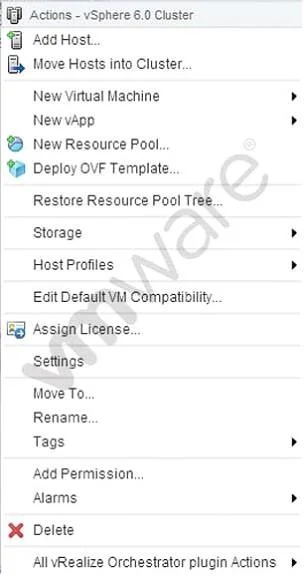
Refer to the Exhibit. A vSphere 6.x environment is configured with VMware Virtual Volumes (VVOLs). An administrator accesses the cluster Actions menu, as shown in the Exhibit. Which option is used…
The correct answer is A. Storage. In a vSphere environment using Virtual Volumes, the 'Storage' option in the cluster Actions menu is used to provision and manage VVOLs on an existing VVOL datastore container.
Question
Refer to the Exhibit. A vSphere 6.x environment is configured with VMware Virtual Volumes (VVOLs). An administrator accesses the cluster Actions menu, as shown in the Exhibit. Which option is used to create a VVOL on an existing VVOL container?
Exhibit
Options
- AStorage
- BDeploy OVF Template
- CNew vApp
- DSettings
How the community answered
(56 responses)- A75% (42)
- B4% (2)
- C5% (3)
- D16% (9)
Why each option
In a vSphere environment using Virtual Volumes, the 'Storage' option in the cluster Actions menu is used to provision and manage VVOLs on an existing VVOL datastore container.
The 'Storage' option within the cluster Actions menu provides access to storage provisioning operations, including creating virtual volumes on an existing VVOL datastore container (protocol endpoint). This is the correct entry point in the vSphere Web Client for VVOL management at the cluster level.
Deploy OVF Template is used to deploy virtual machines or appliances from an OVF/OVA package and has no function in VVOL container or storage object creation.
New vApp creates a vApp container to group virtual machines for resource management purposes and is unrelated to VVOL provisioning.
Settings opens the cluster configuration panel for features such as HA and DRS but does not provide VVOL storage provisioning capabilities.
Concept tested: VMware Virtual Volumes provisioning via cluster Actions menu
Source: https://docs.vmware.com/en/VMware-vSphere/7.0/com.vmware.vsphere.storage.doc/GUID-20D8995A-B2C4-4B29-B88E-9F3E3FCAF864.html
Topics
Community Discussion
No community discussion yet for this question.