
2V0-620 · Question #66
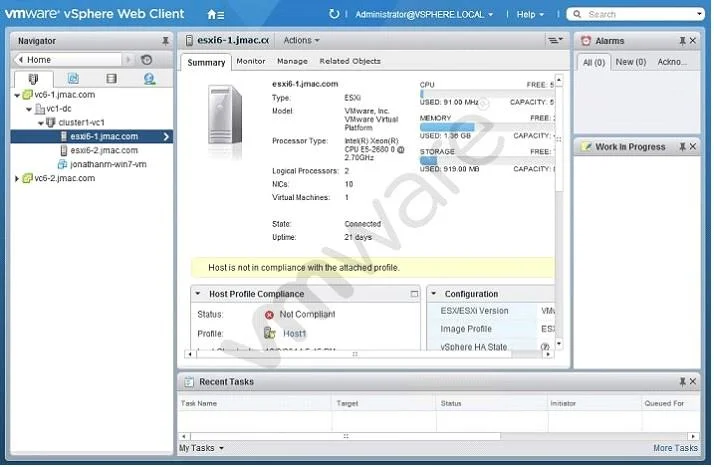
Refer to the Exhibit. An administrator logs into the vSphere Web Client and sees the warning shown in the Exhibit. During a change control window, the warning was addressed. What should be done to…
The correct answer is B. Recheck the compliance of the host. After manually resolving a host compliance warning during a change window, the correct verification step is to recheck compliance, which re-scans the host against its assigned baselines.
Question
Refer to the Exhibit. An administrator logs into the vSphere Web Client and sees the warning shown in the Exhibit. During a change control window, the warning was addressed. What should be done to verify that the host is no longer showing the warning?
Exhibit
Options
- ARun a Remediate host operation.
- BRecheck the compliance of the host.
- CRestart the host to get rid of the warning.
- DInstall VMware tools to clear the warning.
How the community answered
(47 responses)- A2% (1)
- B94% (44)
- D4% (2)
Why each option
After manually resolving a host compliance warning during a change window, the correct verification step is to recheck compliance, which re-scans the host against its assigned baselines.
Remediation applies patches or extensions to bring a non-compliant host into compliance and is the corrective action - not the verification step used after changes have already been manually applied.
Rechecking compliance in vSphere Update Manager or Lifecycle Manager triggers a fresh scan of the host against its attached baselines, confirming whether the previously flagged condition has been corrected without requiring any additional remediation or reboot.
Restarting the host does not re-evaluate or clear compliance warnings; compliance status is determined solely by scanning against defined baselines, not by the host reboot cycle.
Installing VMware Tools addresses in-guest VM software and has no effect on host-level compliance warnings generated by vSphere Update Manager or Lifecycle Manager.
Concept tested: vSphere host compliance recheck after manual remediation
Source: https://docs.vmware.com/en/VMware-vSphere/7.0/com.vmware.vsphere.update_manager.doc/GUID-C6E3FE9E-1A21-4960-B61A-F3B78BBBC9B2.html
Topics
Community Discussion
No community discussion yet for this question.