
2V0-620 · Question #116
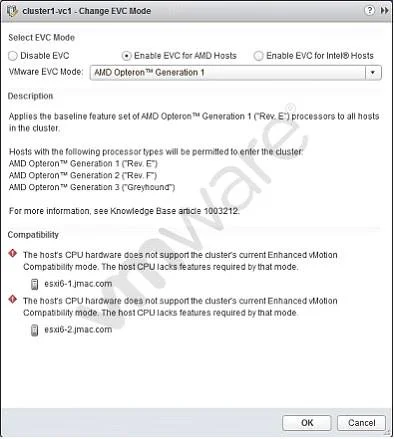
Refer to the Exhibit. An administrator attempts to enable Enhanced vMotion Compatibility (EVC) on a cluster. The operation results in a compatibility error, as shown in the exhibit. What is the…
The correct answer is A. The CPUs in the ESXi host are not AMD CPUs. Enhanced vMotion Compatibility (EVC) baselines are CPU vendor-specific, meaning all hosts in an EVC cluster must use CPUs from the same manufacturer - either all Intel or all AMD.
Question
Refer to the Exhibit. An administrator attempts to enable Enhanced vMotion Compatibility (EVC) on a cluster. The operation results in a compatibility error, as shown in the exhibit. What is the likely cause of this error?
Exhibit
Options
- AThe CPUs in the ESXi host are not AMD CPUs.
- BThe CPUs in the ESXi host do not support hardware virtualization capabilities.
- CThe XD/NX CPU features have not been enabled in the BIOS of the server.
- DThere is no shared storage between the hosts in the cluster.
How the community answered
(27 responses)- A78% (21)
- B7% (2)
- C11% (3)
- D4% (1)
Why each option
Enhanced vMotion Compatibility (EVC) baselines are CPU vendor-specific, meaning all hosts in an EVC cluster must use CPUs from the same manufacturer - either all Intel or all AMD.
EVC works by masking CPU feature sets to a common baseline, but this masking is strictly bound to a single CPU vendor; Intel EVC baselines apply only to Intel CPUs and AMD EVC baselines apply only to AMD CPUs. Attempting to enable an AMD EVC baseline on a cluster containing a host with Intel CPUs (or vice versa) produces an immediate compatibility error, because cross-vendor CPU masking is architecturally unsupported regardless of the EVC level chosen.
Insufficient hardware virtualization support produces a different error related to VM execution capabilities and is not the cause of a CPU vendor compatibility error during EVC enablement.
XD/NX BIOS settings control memory execution protection for virtual machines and are unrelated to the vendor mismatch error that occurs when enabling EVC.
Shared storage is required for live vMotion migrations but is not a prerequisite for enabling EVC on a cluster, so its absence would not cause this type of compatibility error.
Concept tested: Enhanced vMotion Compatibility CPU vendor restriction
Source: https://docs.vmware.com/en/VMware-vSphere/6.7/com.vmware.vsphere.vcenterhost.doc/GUID-EDC25087-405C-4AB8-818A-6D5D1A5A7527.html
Topics
Community Discussion
No community discussion yet for this question.