
2V0-51.23 · Question #54
Hotspot Question An administrator prepared a golden image based on a Windows Server Operating System. They plan to use this image to create a single-session virtual desktop pool. The installation is…
VMware Horizon: Windows Server OS as Single-Session Desktops --- The Core Problem By default, VMware Horizon only allows Desktop OS (Windows 10/11) as golden images for single-session VDI pools. Windows Server OS images are reserved for RDS/multi-session pools. This is why the…
Question
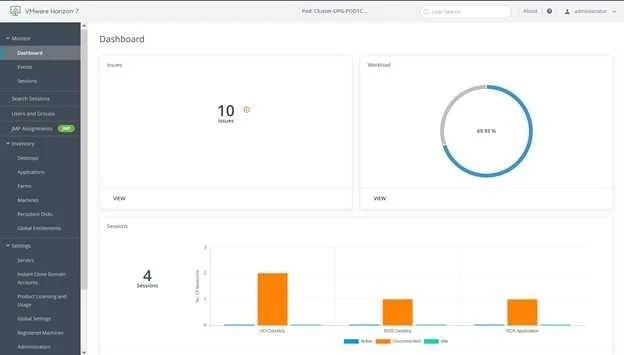
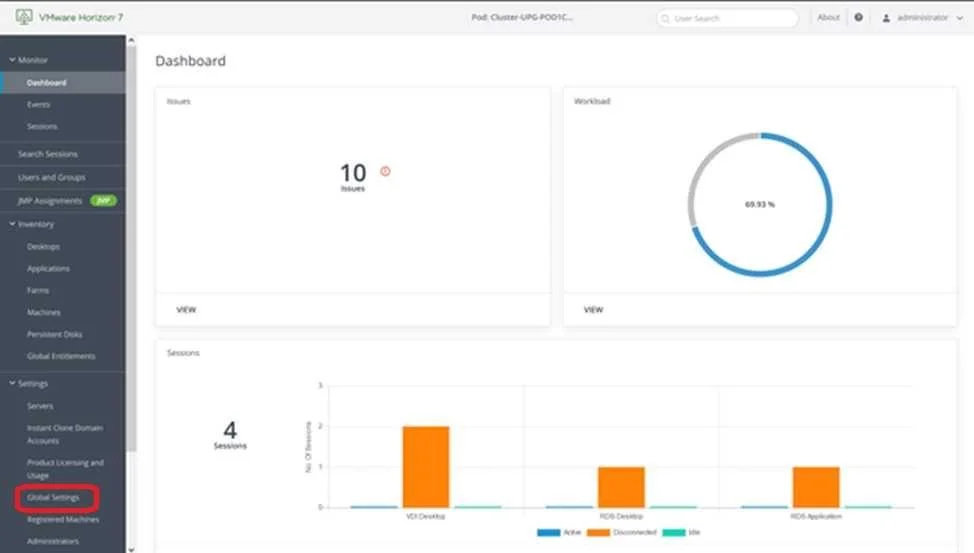
Hotspot Question An administrator prepared a golden image based on a Windows Server Operating System. They plan to use this image to create a single-session virtual desktop pool. The installation is completed, the virtual machine is turned off, and the snapshot has been created. When the administrator creates the desktop pool, they are unable to select the created image and snapshot. They do see other previously created golden images, based on Desktop Operating Systems. The administrator has opened the Horizon Console. Mark the correct menu option where the administrator can enable Windows Server Operating Systems to be used as single-session desktops by clicking on it. A.
Exhibits
Answer Area
- Hotspot Question An administrator prepared a golden image based on a Windows Server Operating System. They plan to use this image to create a single-session virtual desktop pool. The installation is completed, the virtual machine is turned off, and the snapshot has been created. When the administrator creates the desktop pool, they are unable to select the created image and snapshot. They do see other previously created golden images, based on Desktop Operating Systems. The administrator has opened the Horizon Console. Mark the correct menu option where the administrator can enable Windows Server Operating Systems to be used as single-session desktops by clicking on it. A.
Explanation
VMware Horizon: Windows Server OS as Single-Session Desktops
The Core Problem
By default, VMware Horizon only allows Desktop OS (Windows 10/11) as golden images for single-session VDI pools. Windows Server OS images are reserved for RDS/multi-session pools. This is why the administrator can't see the Windows Server-based image - it's filtered out.
The Fix: Global Settings in Horizon Console
To enable Windows Server OS for single-session desktops, the administrator must navigate to:
Horizon Console → Settings → Global Settings → General Settings tab
There is a checkbox/option labeled something like: "Allow use of Windows Server OS as a desktop operating system" (or similar wording depending on Horizon version).
Once enabled, Windows Server-based VMs and their snapshots become selectable when creating single-session desktop pools.
Why This Exists
| OS Type | Default Pool Type |
|---|---|
| Windows Desktop (10/11) | Single-session VDI |
| Windows Server | RDS (multi-session) |
| Windows Server + setting enabled | Single-session VDI (allowed) |
This is a global, administrator-level toggle because using Windows Server as a single-session desktop requires additional licensing (Windows Server VDA license) and is an atypical configuration.
Statement Analysis
Statement 1 - The correct menu path is in Global Settings
Answer: Yes
The setting is not in the pool creation wizard itself, nor in vCenter settings. It's a global Horizon configuration that gates whether Server OS images appear as eligible sources for single-session pools. The pool creation wizard simply respects whatever this global flag is set to.
Memory Tip
"Server = Sessions (by default)" Windows Server defaults to multi-Session (RDS). To flip it to single-session VDI, you need a global override - not a per-pool setting.
Think of it as an unlock: Horizon hides Server OS images from single-session pools globally, so you unlock it globally in Settings → Global Settings.
Topics
Community Discussion
No community discussion yet for this question.