
2V0-51.23 · Question #39
Drag and Drop Question An organization with an existing Windows 2012 R2 Server RDSH farm decided to move to Windows Server 2019 as their new standard. Order the steps that need to be taken by the…
The correct answer is Prepare the Windows Server 2019 golden image.; Add an Automated Farm.; Add a RDS desktop pool.; Entitle AD users and/or groups.; Launch Horizon Client and verify access to RDS desktop. RDS Desktop Pool Deployment with Windows Server 2019 - Order Explained Context This question is about VMware Horizon's Remote Desktop Session Host (RDSH) infrastructure. The administrator is migrating from a Windows 2012 R2 RDSH farm to Windows Server 2019 and needs to stand up…
Question
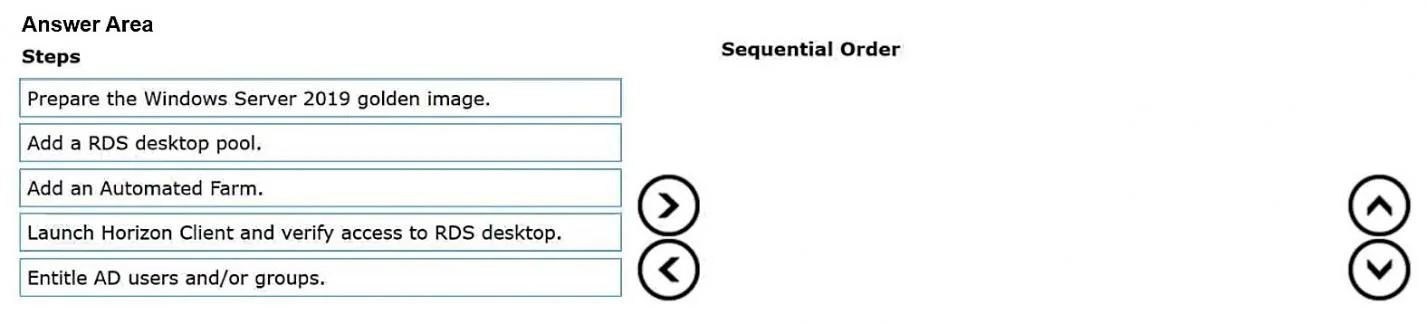
Drag and Drop Question An organization with an existing Windows 2012 R2 Server RDSH farm decided to move to Windows Server 2019 as their new standard. Order the steps that need to be taken by the administrator to deploy a RDS desktop pool with this new standard. Answer:
Exhibit
Answer Area
Drag items
Correct arrangement
- Prepare the Windows Server 2019 golden image.
- Add an Automated Farm.
- Add a RDS desktop pool.
- Entitle AD users and/or groups.
- Launch Horizon Client and verify access to RDS desktop.
Explanation
RDS Desktop Pool Deployment with Windows Server 2019 - Order Explained
Context
This question is about VMware Horizon's Remote Desktop Session Host (RDSH) infrastructure. The administrator is migrating from a Windows 2012 R2 RDSH farm to Windows Server 2019 and needs to stand up a new RDS desktop pool for end users.
Why This Order?
The sequence follows a strict dependency chain: you can't configure what doesn't exist yet.
Step-by-Step Breakdown
1. Prepare the Windows Server 2019 golden image
This must come first because everything downstream depends on it. A golden image is a sysprepped, optimized VM template with the Horizon Agent installed and OS-level configurations applied (roles, features, policies). Without this, Horizon has no OS template to clone when building the farm.
Common mistake: Trying to create the farm before the golden image is ready or forgetting to install the Horizon Agent inside the image, causing farm creation to fail or VMs to be unmanageable.
2. Add an Automated Farm
A farm is the server-side grouping of RDSH hosts that Horizon manages. You create the farm and point it at the golden image you just prepared. Horizon then provisions the Windows Server 2019 RDSH VMs from that image. The farm must exist before you can attach a desktop pool to it - a pool is layered on top of a farm.
Common mistake: Confusing the farm with the pool. The farm = the collection of RDSH servers. The pool = what users connect to. You need the farm first.
3. Add a RDS Desktop Pool
With the farm provisioned and healthy, you can now create the RDS desktop pool and associate it with that farm. The pool defines the user-facing connection settings (display protocol, session limits, etc.). This step is meaningless without an active farm to back it.
Common mistake: Trying to create the pool and the farm simultaneously or before the farm is fully provisioned and in a "Ready" state.
4. Entitle AD users and/or groups
Once the pool exists, you grant access by entitling Active Directory users or groups to it. Entitlement is an authorization layer - it controls who can see and connect to the pool in Horizon Client. There's nothing to entitle until the pool is created.
Common mistake: Skipping this step and then wondering why users can't see the pool in their Horizon Client. Without entitlement, the pool is invisible to end users.
5. Launch Horizon Client and verify access to RDS desktop
Verification is always last. You log in as an entitled user, confirm the pool appears, connect to a desktop, and validate the Windows Server 2019 session works correctly. This is acceptance testing - it proves the entire chain (image → farm → pool → entitlement) is functioning.
Common mistake: Verifying before entitlement is set, then concluding the deployment is broken when it's actually just an access issue.
Summary Table
| Step | What it creates | Why it must be here |
|---|---|---|
| 1. Golden image | The OS template | Nothing else exists to reference |
| 2. Automated Farm | The RDSH server pool | Needs the image; pool needs the farm |
| 3. RDS Desktop Pool | The user-facing resource | Needs the farm to exist |
| 4. Entitle users | Access rights | Needs the pool to exist |
| 5. Verify access | Validation | Can only test after all prior steps complete |
The overarching principle: infrastructure before configuration, configuration before authorization, authorization before testing.
Topics
Community Discussion
No community discussion yet for this question.