
2V0-51.23 · Question #38
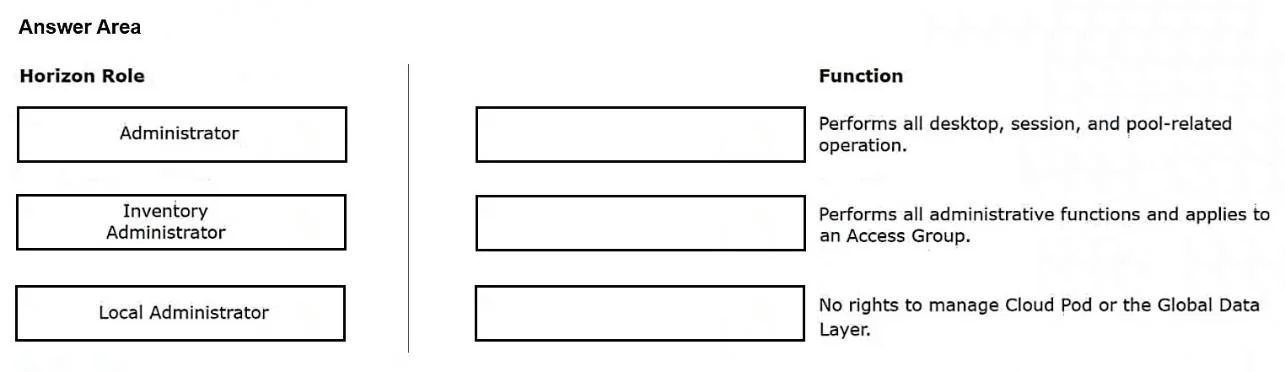
Drag and Drop Question Drag and drop each Horizon console predefined role on the left to its matching function on the right. Answer:
The correct answer is Inventory Administrator: Performs all desktop, session, and pool-related operation.; Administrator: Performs all administrative functions and applies to an Access Group.; Local Administrator: No rights to manage Cloud Pod or the Global Data Layer. VMware Horizon Console Predefined Roles This question tests your knowledge of the three built-in (predefined) roles in the VMware Horizon Console and what scope of authority each one carries. --- Correct Placements Explained 1. Inventory Administrator → "Performs all desktop…
Question
Drag and Drop Question Drag and drop each Horizon console predefined role on the left to its matching function on the right. Answer:
Exhibit
Answer Area
Drag items
Correct arrangement
- Inventory Administrator: Performs all desktop, session, and pool-related operation.
- Administrator: Performs all administrative functions and applies to an Access Group.
- Local Administrator: No rights to manage Cloud Pod or the Global Data Layer.
Explanation
VMware Horizon Console Predefined Roles
This question tests your knowledge of the three built-in (predefined) roles in the VMware Horizon Console and what scope of authority each one carries.
Correct Placements Explained
1. Inventory Administrator → "Performs all desktop, session, and pool-related operations"
The Inventory Administrator role is scoped specifically to inventory objects - desktops, sessions, pools, farms, and applications. It has no authority over global or infrastructure-level settings. Think of it as the "day-to-day operations" role for managing what end users consume.
- Common mistake: Confusing this with a full Administrator. It cannot manage users, roles, permissions, or global configuration - only the objects in the inventory.
2. Administrator → "Performs all administrative functions and applies to an Access Group"
The Administrator role is the most powerful predefined role. It can perform every administrative action available in the console. Critically, it is scoped to Access Groups, meaning you can delegate full admin rights to a subset of your environment (e.g., a specific pod or department) without granting global control.
- Common mistake: Assuming "Administrator" means global/unrestricted. It doesn't - it's powerful but bounded by the Access Group it's assigned to.
3. Local Administrator → "No rights to manage Cloud Pod or the Global Data Layer"
The Local Administrator role is designed for single-pod, on-premises environments. It can manage most local Horizon functions but is explicitly blocked from Cloud Pod Architecture (CPA) features and the Global Data Layer (the shared data store used in multi-pod deployments).
- Common mistake: Assuming Local Administrator is just a "weaker Administrator." The key distinguishing trait is the explicit exclusion of CPA/Global Data Layer access, not just reduced permissions generally.
Quick Memory Aid
| Role | Scope |
|---|---|
| Inventory Administrator | Pools, desktops, sessions only |
| Administrator | Everything - within an Access Group |
| Local Administrator | Everything local - but no Cloud Pod/Global Data Layer |
The pattern: each role removes a layer of reach - from global infrastructure (Local Admin) to administrative controls (Inventory Admin).
Topics
Community Discussion
No community discussion yet for this question.